

Hey, this is Golam. Welcome to my MapMatic AI review.
Let me ask you a simple question. How many local businesses in your town still do not have a website? The plumber. The barber. The small café. The handyman. A 2025 Clutch survey found that 17% of small businesses still have no website at all — and many more have an old, broken, or slow one.
Every one of those businesses is a potential client who could pay $500, $700, or even $1,000 for a professional website. The problem was never demand. The problem was always the same: finding those businesses, building a website to show them, and convincing them to say yes — without spending hours on free mockups and cold calls that go nowhere.
I tested MapMatic AI to see if it solves that problem, and in this review I will show you exactly what it is, who created it, how it works step by step, what it costs, and what the early users say. Let us get started.
Introduction
Selling websites to local businesses is one of the oldest and most proven ways to make money online. It is a real service, for real businesses, with real money on the table. It sits perfectly beside other service-based paths my readers love, like becoming a virtual assistant or selling digital products.
But the old way of getting website clients is painful. You search for businesses by hand. You build free sample websites that nobody asked for. You send cold emails that say “I can build you a website” — and the owner deletes them, because talk is cheap and they cannot see anything real.
MapMatic AI flips the whole process around. Instead of promising a website, you show one. The system uses Google Maps to find businesses that need websites, builds a custom website for that business in seconds, and gives you a live preview link with a personalized video that sells for you. The owner sees their own business looking beautiful online — before you ever ask for a dollar.
The timing is also important. MapMatic AI launches on Wednesday, November 18 at 11:00 AM EST, and the launch window closes on Tuesday, November 24 at 11:59 PM EST. During this window, the front-end price is at its lowest, so this review is here to help you decide before the cart opens.
What Is MapMatic AI?
MapMatic AI is an AI-powered Google Maps client acquisition system. In simple words, it helps you discover local businesses that have no website, an outdated website, or a poor online presence — and then turns those businesses into paying website clients.
Inside one app, you get a Google Maps lead finder, an AI website studio that builds a full website for a business in under 4 seconds, a website auditor for businesses that already have a site, an AI outreach email writer, live preview pages that track when an owner opens them, a proposal generator, and a simple CRM pipeline to manage every deal.
The whole thing runs in your browser. There is nothing to install, no coding, and no design background needed. MapMatic even includes an agency license on the front-end, so you are free to sell the websites you create as a service.
Think of it like this: Google Maps is the biggest free list of local businesses on Earth. MapMatic AI turns that list into your personal client pipeline.
MapMatic AI Overview
| Product Name | MapMatic AI (MapMatic Pro — Limited Edition) |
| Product Type | AI Google Maps client acquisition & website builder system |
| Creator | Victory Akpos |
| Launch Date | Wednesday, November 18, 2026, 11:00 AM EST (cart closes November 24, 11:59 PM EST) |
| Front-End Price | $29 one-time during launch (regular price $97) |
| Bundle Deal | $347 with coupon code MM50 |
| License Included | Agency license — sell websites as a service |
| Money-Back Guarantee | 30 days |
| Where To Buy | MapMatic AI Official Website |
Now let me tell you about the person who built this system.
Meet The Creator: Victory Akpos

MapMatic AI was created by Victory Akpos, the founder of MapMatic. His support team works through the Supreme Web customer care desk, and he is personally active with partners and users around this launch.
What I like about Victory’s approach is how clearly he understands the real problem. In his own launch materials, he explains that people who want to sell websites do not actually have a website-building problem — they have a client discovery, website creation, and client acquisition problem, all at once. MapMatic was built to attack all three together, in one workflow.
He also runs this launch in a very partner-friendly way, with a full JV page, a detailed document for affiliates, a live pre-launch webinar on November 18 at 10:00 AM EST where he pitches the bundle deal himself, and a proper support desk for customers. When I test a product for my readers, a creator who shows up live, documents everything, and stands behind a 30-day money-back guarantee is exactly what I want to see.
Now, let me walk you through how the system actually works.
How Does MapMatic AI Work?
MapMatic AI works in 4 simple steps: Find, Build, Show, Close.
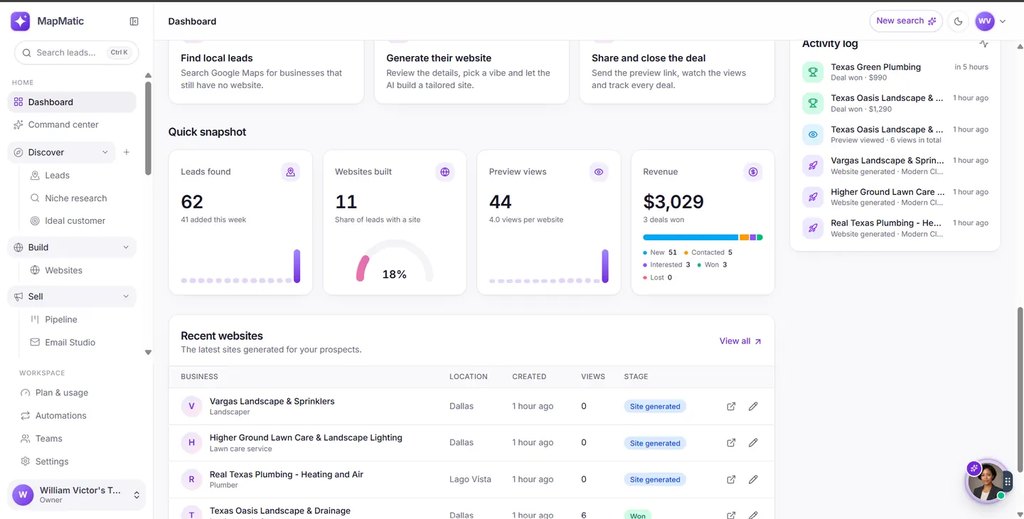
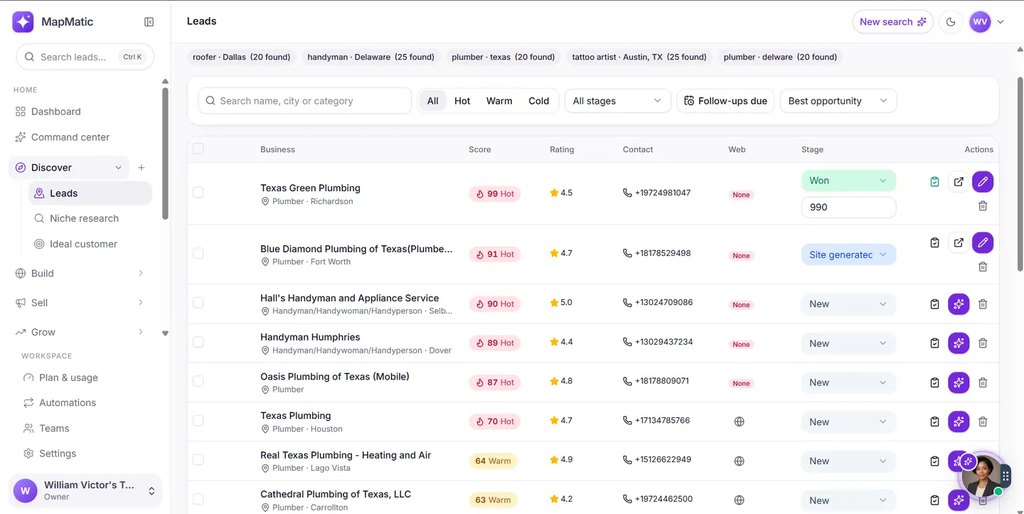
Step 1 — Find. You open the built-in Google Maps Lead Finder and search by industry and location — say, plumbers in Dallas, or barbers in New York. MapMatic shows you the businesses, highlights the ones with no website or a weak one, and scores every lead with an Opportunity Score, so you start with the owners most likely to say yes. When I tested this step, what impressed me most was the focus: instead of a random list of businesses, you get a ranked list of real opportunities, with verified details like phone numbers and emails already attached.
Step 2 — Build. You pick a business, and the AI Website Studio generates a custom website for it in less than 4 seconds — not one design, but 3 concepts to choose from, with real pages like Home, About, Services, and Contact, built from the business’s own verified details. If the business already has an old website, the Website Auditor checks it first and the Redesign Engine builds a modern preview that fixes the problems it found. You can polish anything with the visual editor or just chat with the AI to make changes. No code, ever.
Step 3 — Show. This is the magic step. You send the business owner a live preview of their new website, with an embedded personalized video that presents the opportunity for you, plus a simple button for the owner to claim the website. The AI even writes your outreach email for you — it references the exact issue it found with that business, so your message sounds personal, not spammy. And because the preview page is tracked, you can see the moment the owner opens it, and follow up while you are fresh in their mind.
Step 4 — Close. When the owner replies, you open the proposal generator, offer your packages, and agree on the project. You set your own price — the system’s model is built around charging $497, $597, $997, or more per website, depending on the business and the work involved. Then you deliver the finished site by exporting the HTML/ZIP or publishing it, and manage the whole deal inside the built-in CRM pipeline.
Find, Build, Show, Close. That is the whole business in four steps, and most of the heavy work is done by the AI.
✅ Visit MapMatic AI Official Website Here ►
Watch The MapMatic AI Demo Here
Reading about it is one thing — seeing it is much better. Watch the official demo below and see MapMatic go from a Google Maps search to a finished website preview in seconds:
Key Features
AI Opportunity Finder With Scoring
Search businesses by industry and city, then filter by the problems that make a business a perfect prospect: no website, a broken site, or no SSL security. Every lead gets an explainable Opportunity Score, so your time goes to the owners most likely to buy.
Website Auditor And Redesign Engine
For businesses that already have a website, the auditor finds the real issues — slow loading, weak design, missing pieces — and the Redesign Engine builds a modern preview that fixes them. This opens a second, huge market: owners who would gladly pay to upgrade the old site they already have.
AI Website Studio — 3 Concepts Per Business
The Studio builds a complete multi-page website from the business’s verified details in under 4 seconds, and gives you 3 different concepts to pick from. A visual editor and chat-to-edit AI let you adjust anything in plain words — no design skills and no code.
Live Preview Pages With Tracking
Every preview is a live page with a personalized video and a claim button. You can see exactly who opened their website and how many times, so you always know who is warm and who to follow up with first.
AI Outreach Email Writer
The app writes your first email for you, based on the specific business and the exact problem it found. You send it from your own inbox, like a normal person — the system is designed around a handful of personal emails a day (about 5 a day builds roughly 100 live previews a month), not spam blasts.
Proposal Generator And CRM
Turn interest into a signed project with built-in proposals — owners can pick from your Starter, Professional, or Growth packages. The CRM pipeline then tracks every lead from first search to paid client, so nothing falls through the cracks.
Easy Delivery: Export Or Publish
When a client says yes, deliver the finished website as an HTML/ZIP export or publish it on a custom domain with SSL. The client gets a real, professional website, and you get paid like a real agency. If you later want to grow into a full agency setup, this pairs well with the approach in my AI Agency Engine review.
Agency License Included
The front-end already includes the agency license. You can sell websites to as many clients as you can land, and keep 100% of what you charge. There is no extra fee for doing commercial work.
Tutorials And A Client-Getting Plan
Step-by-step tutorials walk you through every screen, and the included client-getting plan shows you the daily routine — so even a complete beginner knows exactly what to do on day one. And once your clients are online, my guide on getting free traffic to a website is a great next service you can offer them.
Who Should Use MapMatic AI?
- Beginners who want a practical, done-for-you way into the website-selling business.
- Freelancers and web designers who want more clients and a much faster workflow.
- Digital marketing agencies that want a steady stream of new website projects.
- Local marketing consultants who already serve businesses and want another service to offer.
- Side hustlers who want an income stream that runs on about half an hour a day.
- Anyone who hates cold calling and is tired of building free mockups nobody looks at.
Who Should Not Use MapMatic AI?
MapMatic AI is a client-getting tool, not a magic button. If you are not willing to send a few personal emails a day and follow up with interested owners, no tool can close clients for you. The system does the finding, building, and presenting — the short human conversation at the end is still yours.
It is also not the right fit if you only want a drag-and-drop builder for your own single website and nothing else — a plain website builder is simpler for that one job (and if building your own online platform is your goal, my MarketPresso 3.0 review covers a different angle). MapMatic shines when you want clients, not just a website.
For everyone who wants to sell websites as a service, this is one of the most complete starter systems I have seen at this price.
MapMatic AI Pricing
MapMatic AI launches on Wednesday, November 18, 2026 at 11:00 AM EST, and the cart closes on Tuesday, November 24, 2026 at 11:59 PM EST. Here is the full funnel:
- Front-End — MapMatic Pro (Limited Edition): $29 one-time during the launch window (regular price $97). You get the complete app: AI Opportunity Finder with scoring, Website Auditor + Redesign Engine, AI Website Studio with 3 concepts per business, visual editor + chat-to-edit AI, live preview pages with tracking, AI outreach email writer, proposal generator + CRM, HTML/ZIP export, tutorials + client-getting plan, and the agency license.
- OTO 1 — MapMatic Unlimited Edition: $97. Removes the limits so you can search, build, and outreach at full scale.
- OTO 2 — MapMatic DFY AgencyVault + Sales Toolkit: $197. Done-for-you agency assets and a complete sales toolkit to close clients faster.
- OTO 3 — MapMatic Reputation Management App: $97. Add review and reputation services for your clients — an easy monthly upsell.
- OTO 4 — MapMatic Multichannel Sales Outreach: $127. Reach prospects on more channels, not just email.
- OTO 5 — MapMatic Reseller License: $297. Sell MapMatic itself as your own product and keep the profits.
The Bundle Deal: If you want everything in one shot, the MapMatic Bundle gives you the full system at a launch discount — $347 when you use the coupon code MM50 at checkout ($50 off). For serious buyers who plan to use the upgrades anyway, the bundle is the smartest money on the page.
✅ Get The MapMatic AI Bundle Deal Here ►
You also get two valuable fast-action bonuses free with your order today: ADA Suite (worth $497) — an accessibility analyzer and agency kit that lets you offer website accessibility services to the same clients — and MobiCentric (worth $497) — a platform to build iOS and Android apps for your clients with no coding. Both turn one-time website clients into bigger, recurring contracts.
Let me put the front-end price in perspective. Doing this work the normal way means paying separately for a lead tool (about $49/month), a website builder (about $99/month), an audit tool (about $99/month), an AI writing tool (about $49/month), and a CRM. MapMatic replaces that whole stack for $29, once. And your very first website client — at the $497 level the system is designed around — covers the cost many times over.
Everything is protected by a 30-day money-back guarantee. Test the full system, send real previews, and if it is not for you, you get your money back.
✅ Visit MapMatic AI Official Website Here ►
Pros and Cons
Pros:
- Finds real clients for you — Google Maps leads scored by opportunity, not random lists.
- Builds a custom website preview in under 4 seconds, with 3 concepts to choose from.
- You show owners a finished website instead of promising one — conversations start warm.
- AI writes your outreach email and the personalized preview video sells for you.
- Preview tracking shows you exactly who opened their site, and when.
- Proposals and CRM are built in — the whole business runs in one app.
- Agency license included on the front-end; keep 100% of what you charge.
- Replaces a stack of tools that would cost $49–$99 per month each.
- Two $497-value bonuses (ADA Suite + MobiCentric) included free today.
- Full 30-day money-back guarantee.
Cons:
- You still send the emails and do the follow-up yourself — it is a system, not a robot employee.
- The best launch pricing is only available inside the November 18–24 launch window.
- Heavy users will want the Unlimited Edition upgrade to remove usage limits.
Real User Experience
MapMatic AI opens to the public on November 18, but the system has already been in the hands of beta testers, and their feedback on the official page tells a consistent story.
Eri A. shared that finding businesses that actually needed a website was always the hard part — and that MapMatic finally gave a clear starting point, by quickly showing which businesses have no website or an outdated one.
Henry Santos, who has no design background, said the tool made website building feel far less scary: he picks a business, generates a few concepts, and has something professional in minutes, with changes he can make without code.
Lennox G. loved the outreach help most — instead of staring at a blank email, he starts from a draft written for that exact business and just adjusts a few words to sound like himself.
John T. praised the auditor: seeing a business’s current website first gives him specific, plain-language talking points, so the preview feels relevant instead of generic.
Prasad M. put the core idea in one line: showing the website makes the conversation so much easier, because the owner can see the offer instead of taking your word for it.
And Dumka E. highlighted the all-in-one workflow — lead search, previews, outreach emails, and proposal management in one place, instead of juggling five different tools.
That matches exactly what I saw when I tested the flow: the system removes the three things that stop most people — finding clients, building the site, and knowing what to say.
Tips For New Members
1. Start with one niche and one city — plumbers in one town, for example. Focus beats random searching every time.
2. Work from the top of the Opportunity Score list down. The highest-score leads are the warmest doors to knock on.
3. Send about 5 personal emails a day, every day. That steady rhythm builds roughly 100 live previews a month — a full pipeline.
4. Always read the AI email once and tweak a few words so it sounds like you. Personal beats perfect.
5. Watch your preview tracking. The moment an owner opens their site two or three times, follow up that same day.
6. Price with confidence. A professional website is worth $497 and up to a local business — offer packages so the owner can choose.
7. After your first client, offer the extras: ADA accessibility from the free ADA Suite bonus, or an app from MobiCentric. One happy client can become monthly income.
8. Join the pre-launch webinar on November 18 at 10:00 AM EST if you can — the creator walks through the system and the bundle live.
✅ Visit MapMatic AI Official Website Here ►
Frequently Asked Questions
When does MapMatic AI launch, and when does the cart close?
MapMatic AI launches on Wednesday, November 18, 2026 at 11:00 AM EST. The launch window closes on Tuesday, November 24, 2026 at 11:59 PM EST. The $29 front-end price and the bundle coupon are launch offers, so they are tied to this window.
Do I need design or coding skills to use MapMatic AI?
No. The AI Website Studio builds the websites, the visual editor and chat-to-edit AI handle changes in plain words, and step-by-step tutorials walk you through every screen. Beta testers with zero design experience are already using it comfortably.
Can I really sell the websites I create?
Yes. The front-end includes an agency license, so you can sell websites to local businesses as a service and keep 100% of what you charge. You set your own prices — the system’s model is built around charging $497 or more per website project.
How does the bundle deal work?
The MapMatic Bundle combines the front-end with the upgrades in one package. During launch it is $347 when you apply the coupon code MM50 at checkout, which saves you $50 and costs far less than buying each upgrade separately.
What if MapMatic AI is not for me?
Your purchase is protected by a 30-day money-back guarantee. Use the system, send real previews to real businesses, and if you decide it is not a fit, you can get your money back within 30 days.
Does MapMatic AI work in my country and language?
The lead finder works anywhere Google Maps lists local businesses, and website previews can be built in other languages too — which is great if your local businesses serve their community in a language other than English.
Final Verdict
After testing the flow and studying everything in this launch, my verdict is clear: MapMatic AI is one of the smartest client-getting systems I have reviewed this year.
It takes the three hardest parts of selling websites — finding businesses that need one, building something impressive to show them, and starting the conversation — and turns all three into a simple 4-step system powered by AI. You show owners their own beautiful new website before you ever pitch, and that changes everything about how the conversation goes.
At $29 one-time for the front-end, with an agency license, two $497-value bonuses, and a 30-day money-back guarantee, the risk is tiny and the upside is a real service business with real clients. If you have ever wanted to sell websites but did not know where to start, start here — and if you want the complete system, grab the bundle with coupon MM50 before the launch window closes on November 24.