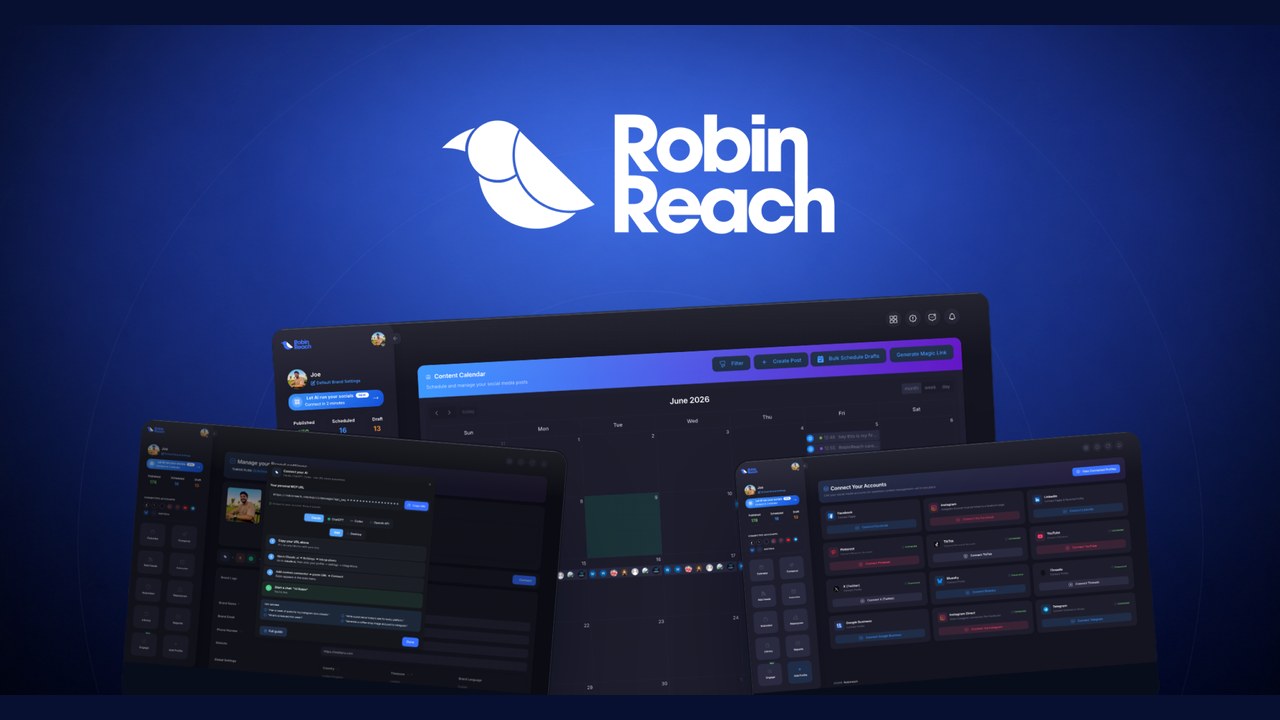
Hey, this is Golam. Welcome to my RobinReach review.
If you run a business, a brand, or even your own personal pages, you know the pain. Social media never sleeps. Facebook wants a post. Instagram wants a Reel. TikTok, YouTube, LinkedIn, Pinterest — every platform wants fresh content, every single day.
So you open five apps, write the same post five times, and lose an hour of your day. Or you pay for a scheduler tool that charges you every month, for every channel, forever.
I went looking for a better way, and that search brought me to RobinReach. In this review, I will show you exactly what RobinReach is, who built it, how it works, what it can do, what it costs, and what real users say about it. By the end, you will know if this lifetime deal is right for you.
Introduction
Social media is one of the best free ways to grow a business today. My readers ask me about it all the time. In fact, two of my most loved guides are about making money on Pinterest and making money on TikTok without followers. The traffic is there. The problem is the work.
Posting by hand on many platforms takes hours every week. The big scheduling tools solve the work problem, but they create a money problem: monthly fees that never end, and extra charges as you add channels and team members.
RobinReach attacks both problems at once. It is an AI-powered social media platform that creates your content, schedules it, posts it to 13 platforms, answers your comments, and reports your results — all from one simple dashboard. And right now, on AppSumo, you can get it for one single payment, for life.
The timing matters here. RobinReach is back on AppSumo for Black Friday, and at the time I am writing this review, the deal page shows these are the lowest prices, with a price rise coming on November 18. So if this tool fits you, this is the week to look at it closely.
What Is RobinReach?
RobinReach is an all-in-one social media management platform. It helps you create, schedule, automate, and repurpose social media content across 13 platforms from one place.
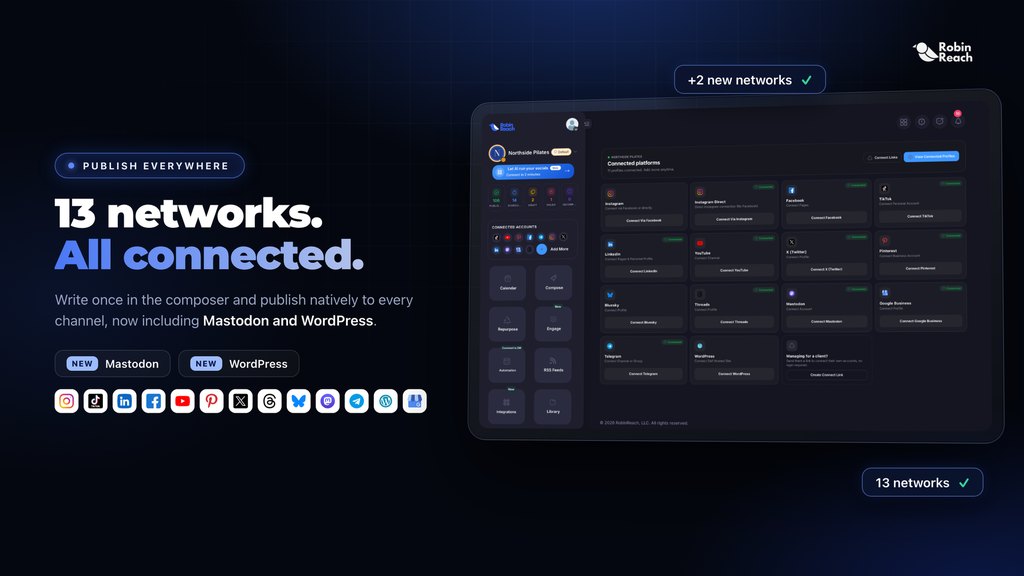
Those 13 platforms are Facebook, Instagram, X (Twitter), LinkedIn, YouTube, TikTok, Pinterest, Threads, Bluesky, Mastodon, Telegram, Google Business Profile, and WordPress. That list is bigger than most tools offer. It even covers places other schedulers forget, like Telegram and your Google Business Profile.
Inside RobinReach, you get an AI writer that creates captions in your brand voice, an AI image maker called RobinPixel, a drag-and-drop content calendar, a single inbox for all your comments and messages, deep reports and analytics, and smart automation that can turn your blog posts and shop products into social posts on its own.
It is made for small businesses, creators, freelancers, and agencies. More than 9,500 customers already use it, and on AppSumo it holds a strong rating of 4.66 out of 5 from 119 reviews.
In short: RobinReach is the tool you open once in the morning, and your whole social media day is handled.
RobinReach Overview
| Product Name | RobinReach |
| Product Type | AI social media management and scheduling platform |
| Founder & CEO | Shaher |
| Platforms Supported | 13 — Facebook, Instagram, X, LinkedIn, YouTube, TikTok, Pinterest, Threads, Bluesky, Mastodon, Telegram, Google Business Profile, WordPress |
| Customers | 9,500+ businesses, creators, and agencies |
| AppSumo Rating | 4.66 out of 5 (119 reviews) |
| Price Starts At | $69 one-time for lifetime access |
| Money-Back Guarantee | 60 days via AppSumo |
| Where To Buy | RobinReach on AppSumo |
Now let me introduce you to the man behind the tool, because his story explains why RobinReach is built the way it is.
Meet The Creator: Shaher, Founder & CEO

RobinReach was founded by Shaher, the company’s Founder and CEO. The company is based in London, UK.
Shaher’s own words about the idea are simple and honest. RobinReach was born from his personal struggle to stay active on social media while juggling multiple accounts. Most tools he tried were either too expensive or did not meet all his needs. So he decided to build the tool he wished existed: an affordable, all-in-one platform for small businesses and agencies.
That origin shows in how the company behaves. RobinReach first launched on AppSumo in early 2025 as a young product. Instead of disappearing after the launch, the team kept shipping new features almost every week, driven by user feedback. They relaunched in July 2026 with a much bigger product, and now they are back for Black Friday with rebuilt analytics, a stronger inbox, a bio page builder, and better AI tools.
One thing I respect a lot: when the relaunch adjusted some limits, Shaher explained it openly on the deal page, and he promised that everyone who bought in the first launch keeps their original limits forever, fully grandfathered. That is how a founder earns trust.
When I test a tool for my readers, an active founder who listens, ships fast, and keeps his promises is a very strong sign.
How Does RobinReach Work?
RobinReach works in four simple steps.
Step 1: Connect your accounts. You link your social profiles once. Users on AppSumo praise how smooth and fast this connection is. Your accounts then live in one clean dashboard, grouped by brand.
Step 2: Create your content. Write your post yourself, or let the AI help you. The AI caption assistant learns your brand voice, your tone, and your mission, so the words sound like you. Need a picture? RobinPixel creates AI images in many styles, up to 4K quality. You can also pull media from your library or Google Drive.
Step 3: Schedule and publish everywhere. Drop your post into the visual calendar, pick your time, and RobinReach publishes it natively to every platform you choose — posts, Reels, Stories, videos, even full YouTube videos. You can also bulk upload a whole month of content with one CSV file.
Step 4: Engage and grow. All comments, direct messages, and Google reviews land in one Engage inbox, so you answer everyone from one place. The analytics then show you your best posts, your best posting times, and how each brand is growing.
Here is what a normal week looks like with this flow. On Monday morning, you sit with one cup of tea and plan the week: the AI drafts your captions, RobinPixel makes the images, and you drag everything into the calendar in about thirty minutes. For the rest of the week, RobinReach posts for you, gathers every comment and message into one inbox, and quietly turns your new blog posts and shop products into fresh social posts. On Friday, you open the reports, see your best times and top posts, and plan an even better next week. That rhythm — plan once, grow all week — is exactly what busy business owners dream about.
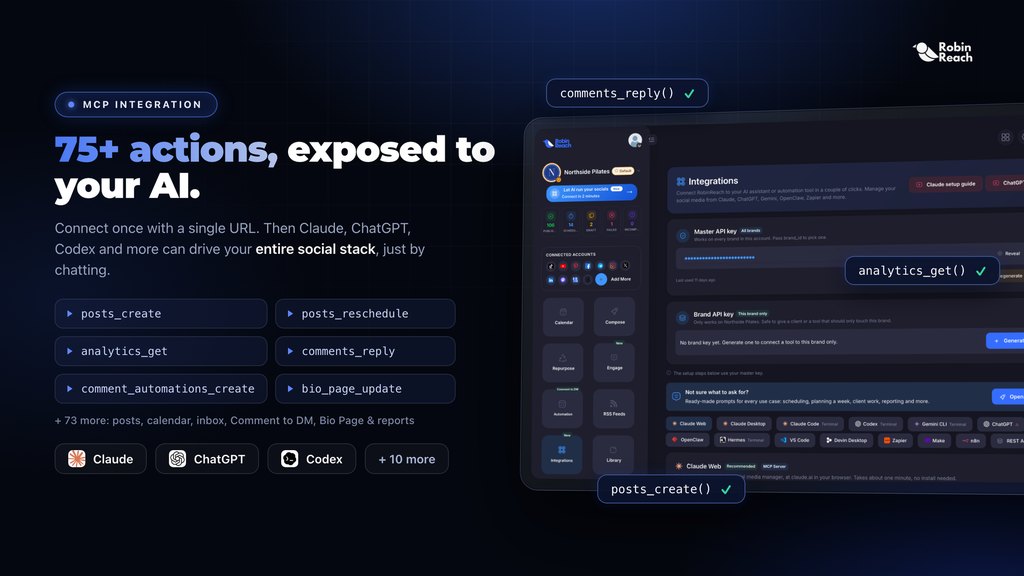
There is also a fifth, very modern step. RobinReach has a built-in MCP connection and a full API. That means AI tools like Claude, ChatGPT, and Codex can drive your social media for you — creating posts, replying to comments, and pulling reports — through simple chat. It is like hiring a social media assistant who never sleeps.
Get RobinReach Lifetime Deal Here
Key Features
Publish To 13 Platforms From One Dashboard
Write once, publish everywhere. RobinReach posts natively to Facebook, Instagram, X, LinkedIn, YouTube, TikTok, Pinterest, Threads, Bluesky, Mastodon, Telegram, Google Business Profile, and WordPress. Stories and Reels on Facebook and Instagram are supported directly from the dashboard too.
AI Content Creation That Sounds Like You
The AI assistant writes captions, descriptions, and full posts, and it learns your brand voice, tone, and mission for every brand you manage. RobinPixel creates matching images in many styles, up to 4K. Together, they turn one idea into a ready-to-post package in minutes.
Smart Calendar And Bulk Scheduling
The drag-and-drop calendar gives you a bird’s-eye view of everything. Real video previews, fast search, and bulk file management keep it tidy. With CSV bulk upload, you can schedule weeks of posts in one sitting — one AppSumo reviewer shared that he loaded all his accounts and scheduled an entire month of content in one go.
One Inbox For Every Conversation
The Engage inbox brings Facebook and Instagram DMs, comments from Facebook, Instagram, LinkedIn, Threads, and YouTube, and your Google Business reviews into a single screen. No more hunting through apps to answer people.
Comment To DM Automation
This clever feature automatically turns Facebook and Instagram comments into private DM conversations, with follower checks, reminders, and messages you can customize. It turns casual commenters into real leads while you sleep.
Reports And Analytics That Guide You
The rebuilt analytics show performance comparisons, your top posts, brand comparisons, and the best posting times based on your real engagement. Agencies can export clean white-label PDF reports for clients.
Content Repurposing And Automation
RobinReach republishes your evergreen posts, cross-posts Instagram Reels and TikTok videos to your other platforms, and can even turn a tweet into an image post. RSS feeds and Social Import (up to 300 existing posts) keep content flowing in automatically. If you sell online, the Shopify, WooCommerce, WordPress, and Etsy integrations turn new products into ready social posts by themselves. If growing reach is your goal, this pairs beautifully with my guide on how to get free traffic to your website.
Your Own Bio Page
RobinReach includes a customizable link-in-bio page with automatic post updates, links, videos, carousels, QR codes, and built-in analytics. That is one less separate tool to pay for.
MCP And API: Let AI Run Your Socials
From Tier 2 up, you get the full REST API and the native MCP integration with 75+ actions. Connect Claude, ChatGPT, or Codex once with a single URL, and your AI can create posts, reschedule, reply to comments, update your bio page, and fetch analytics — just by chatting. For video creators, this pairs nicely with AI video tools like the one in my ViralSpeak AI review.
Teams, Brands, And Approvals
Manage multiple brands and workspaces, each with its own tone and details. Post approval flows keep team work smooth, so nothing goes live before a client or manager says yes.
Who Should Use RobinReach?
- Small business owners who post on many platforms and want their evenings back.
- Creators and influencers growing on TikTok, Instagram, YouTube, and Pinterest at the same time.
- Freelancers and agencies managing social media for several clients and brands.
- Online sellers on Shopify, WooCommerce, or Etsy who want products promoted automatically.
- Bloggers and YouTubers who want every new post and video shared everywhere without manual work — if you are starting out, my guide on making money on YouTube without showing your face shows the content side of this.
- Anyone tired of monthly scheduler bills that grow with every channel they add.
- AI lovers who want Claude or ChatGPT to help run their social media through MCP.
Who Should Not Use RobinReach?
RobinReach is a happy fit for most people, but not for everyone. If you only post on one platform once in a while, a free built-in scheduler may be enough for you. If you run a huge enterprise team that needs very deep, custom analytics and formal enterprise contracts, a big enterprise suite may fit better.
Also, Facebook does not offer an official API for posting into Facebook Groups, so no tool — including RobinReach — can automate Group posting; Pages and Instagram business accounts are fully supported. And like every AppSumo lifetime deal, you should activate your license within 60 days of purchase.
For everyone else — creators, businesses, freelancers, and agencies who post regularly — RobinReach covers the full job beautifully.
RobinReach Vs Monthly Scheduling Tools
Many of my readers come to this review because they are tired of tools like Buffer, Hootsuite, or Later. Those are fine tools, but their pricing model hurts small businesses: you pay every month, and the bill grows every time you add a channel, a brand, or a team member.
RobinReach flips that model. Your tier includes a bundle of profiles — 5, 15, 40, or even 200 — and the eleventh account costs you nothing extra, because you already own the plan. There is no per-channel billing and no monthly meter running.
It also bundles things the monthly tools often charge extra for, or do not offer at all: AI image generation, Comment-to-DM automation, a link-in-bio page, full YouTube video publishing, WordPress and Telegram posting, client approval links, and the MCP connection for AI tools. Buying those as separate apps would cost more every single month than this entire lifetime deal costs once.
Let me do simple math. A common monthly setup — a mid-level scheduler at about $24 a month — costs $288 every year, year after year. RobinReach Tier 2 is $169 once. Before the first year ends, you are already ahead, and every year after that is pure saving. For a small business watching every cost, that difference is real money.
That is why this Black Friday return matters. A tool people already loved at monthly prices is now available for one payment — and that chance does not stay open forever.
RobinReach Pricing
RobinReach is on AppSumo right now as a lifetime deal. You pay once, and you own your plan for life, including all future updates for your plan. There are four tiers:
- License Tier 1 — Sprout: $69 one-time. 5 social profiles, 200 AI text posts per month, 20 AI images per month, 1 RSS feed integration. Perfect for solo creators and small pages.
- License Tier 2 — Bloom: $169 one-time. 15 social profiles, 500 AI text posts per month, 50 AI images per month, 3 RSS feeds, plus full API and MCP access. The sweet spot for growing businesses and freelancers.
- License Tier 3 — Thrive: $369 one-time. 40 social profiles, unlimited AI text posts, 100 AI images per month, 10 RSS feeds, API and MCP access. Built for agencies and busy teams.
- License Tier 4 — Scale: $719 one-time. 200 social profiles, unlimited AI text posts, 500 AI images per month, unlimited RSS feeds, API and MCP access. For large agencies that run many brands.
Now compare that with normal pricing. On RobinReach’s own site, monthly plans start at $9 a month and the Bloom plan runs $24 a month. Tools like Buffer charge for every channel, every month, forever. With this deal, Tier 1 costs about the same as a few months of a normal subscription — and then you never pay again. That is the magic of a lifetime deal.
You can also upgrade or downgrade between tiers while the deal is live, and earlier AppSumo buyers keep their original limits grandfathered, exactly as the founder promised.
One honest timing note: this is AppSumo’s Black Friday deal, and the prices are at their lowest right now. The deal page shows the current prices are set to rise on November 18, so if you want in, do not sit on it for long.
And you are fully protected: every purchase comes with AppSumo’s 60-day money-back guarantee. Try RobinReach for two full months, and if it does not fit your workflow, get your money back.
Get RobinReach Lifetime Deal Here
Pros and Cons
Pros:
- One-time payment for lifetime access — no monthly bills ever again.
- 13 platforms in one dashboard, including Telegram, Mastodon, and Google Business Profile.
- AI captions that learn your brand voice, plus RobinPixel AI images up to 4K.
- One inbox for comments, DMs, and Google reviews across platforms.
- Comment-to-DM automation turns comments into leads.
- Powerful automation: RSS, Social Import, evergreen resharing, and shop integrations.
- MCP and API access lets Claude and ChatGPT run your socials (Tier 2 and up).
- Strong 4.66 out of 5 rating from 119 AppSumo reviews, and 9,500+ customers.
- Active founder who ships improvements almost every week.
- Full 60-day money-back guarantee through AppSumo.
Cons:
- MCP and API access starts at Tier 2, not on the entry tier.
- AI image generation has monthly limits that depend on your tier.
- Facebook Groups cannot be automated, because Facebook offers no official API for it.
Real User Experience
RobinReach holds a 4.66 out of 5 rating from 119 reviews on AppSumo, and 4.9 out of 5 on G2. The pattern in the reviews is very clear: users love how easy it is to connect accounts, how much time the scheduling saves, and how good the AI content tools are.
AppSumo’s own summary of the reviews praises RobinReach for its seamless account connection, AI content creation, and efficient scheduling, and calls it a solid buy for anyone who needs a complete social media automation tool.
One reviewer shared that after switching from a well-known monthly tool, he loaded all his accounts into RobinReach and scheduled an entire month of content in one sitting. Another happy customer started on Tier 2 and upgraded to Tier 3 — which says a lot about how the tool performs in daily use.
On G2, a fitness coach and creator praised the multi-platform posting, the clean scheduling calendar, and the drag-and-drop editor, saying she can prepare Instagram, Facebook, TikTok, and Pinterest versions of her content in one place and plan a full week in minutes.
That is exactly the experience this tool promises: less time posting, more time growing.
Tips For New Members
1. Connect your most important accounts first, and group them by brand. A tidy setup makes everything else easier.
2. Fill in each brand’s tone and mission carefully. The AI writes much better captions when it knows your voice.
3. Plan a week at a time in the calendar. Batch your work on one day, and let RobinReach post all week.
4. Use the CSV bulk upload when you have a month of content ready. It is the fastest way to fill your calendar.
5. Turn on Comment to DM for your best posts. It quietly turns comments into conversations and leads.
6. Check the analytics every Friday. Your best posting times and top posts tell you exactly what to make next.
7. Set up one RSS automation for your blog or shop. Fresh products and posts will share themselves.
8. If you use Claude or ChatGPT, connect the MCP link on Tier 2 or higher. Chatting your posts live feels like magic the first time.
Get RobinReach Lifetime Deal Here
Frequently Asked Questions
Which social media platforms does RobinReach support?
RobinReach supports 13 platforms: Facebook, Instagram, X (Twitter), LinkedIn, YouTube, TikTok, Pinterest, Threads, Bluesky, Mastodon, Telegram, Google Business Profile, and WordPress.
Can I post Instagram and Facebook Stories and Reels from RobinReach?
Yes. You and your team can post Instagram and Facebook Stories, as well as Reels, directly from the RobinReach dashboard.
Does RobinReach have AI content tools?
Yes. The AI assistant writes captions and posts in your brand voice, and RobinPixel creates AI images in many styles, up to 4K quality. Higher tiers include more monthly AI posts and images.
What is the MCP integration?
MCP lets AI tools like Claude, ChatGPT, and Codex connect to RobinReach with a single URL and manage your social media through chat — creating posts, replying to comments, updating your bio page, and reading analytics. It is included from License Tier 2 up, together with full API access.
Is RobinReach really a one-time payment?
Yes. On AppSumo, you pay once for your tier and get lifetime access, including all future updates for your plan. Just remember to activate your license within 60 days of purchase.
What if RobinReach is not for me?
Every purchase is covered by AppSumo’s 60-day money-back guarantee. Use the tool for up to two months, and if it does not fit your workflow, you can get a full refund.
Final Verdict
After studying the full deal, the features, and the user reviews, my verdict is simple: RobinReach is one of the best-value social media tools I have reviewed this year.
It does the whole job — creating content with AI, scheduling to 13 platforms, answering comments and messages in one inbox, automating your blog and shop posts, and reporting what works. Then it adds a touch of the future with MCP, so your AI assistant can help run everything. And instead of renting all of that month after month, you pay once and own it for life.
If you post on social media every week, this deal pays for itself in a few months and then keeps saving you money and hours for years. My honest advice: pick the tier that matches your accounts today — Tier 2 is the sweet spot for most people — and grab it while the Black Friday pricing is still live.