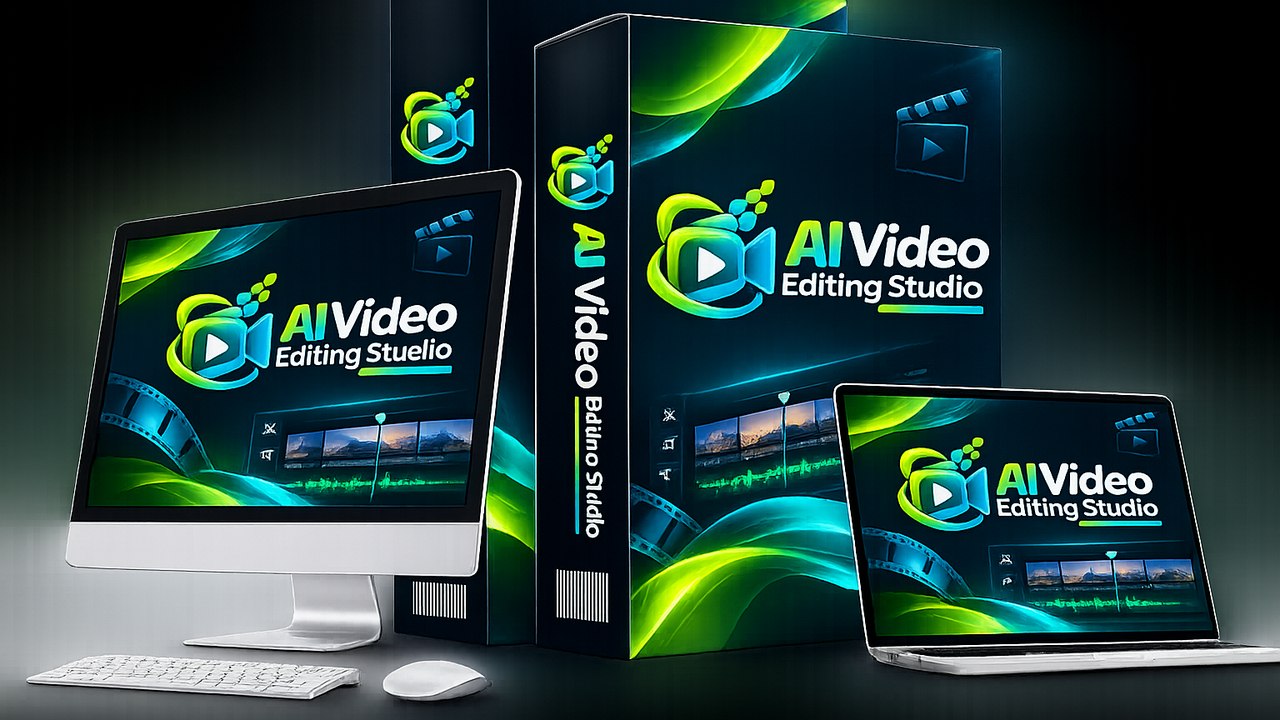
Hey, this is Golam. Welcome to my AI Video Editing Studio review.
If you make videos — or you want to — you already know the pain. One app to edit. Another app for captions. Another for voiceovers. Another to remove a background. Another for music. Another for stock footage. And almost every single one of them wants a monthly payment from you, forever.
I have tested a lot of video tools on this blog, and I kept waiting for one thing: a real video editor — a proper timeline editor like the pros use — with all the AI tools built inside it, running in a simple browser tab. That tool is finally here. It is called AI Video Editing Studio, it launches on Thursday, November 20 at 11 AM EST, and in this review I will show you exactly what it does, how it works, what it costs, and who should grab it on launch day.
Introduction
Video is the language of the internet now. YouTube, TikTok, Instagram Reels, Facebook — every platform rewards people who post good videos often. Businesses know it too, which is why video editors can charge $200 to $500 for a single finished video.
But the tools fought against us. Pro editing meant expensive software, a powerful computer, and months of learning. Then AI tools arrived — and split into a dozen separate apps, each with its own login, its own learning curve, and its own monthly bill. Making one simple video became a juggling act.
AI Video Editing Studio ends the juggling. It puts a full multi-track timeline editor — the same style of editing you get in Adobe Premiere Pro, Final Cut Pro and CapCut — inside your web browser, and then builds the AI tools right into that editor: AI video generation, one-click captions, AI voiceovers, background removal, AI music and sound effects, and a stock library. No downloads. No installs. No expensive PC. One dashboard, one small one-time price. Let me show you everything.
One more thing before we dive in: this review is published the day before the cart opens, on purpose. Launch prices in this industry reward the people who arrive prepared. Read this page today, watch the demo on the official page, and when the doors open on Thursday at 11 AM EST, you will know in one minute whether this studio belongs in your business — while everyone else is still reading the sales page.
What Is AI Video Editing Studio?
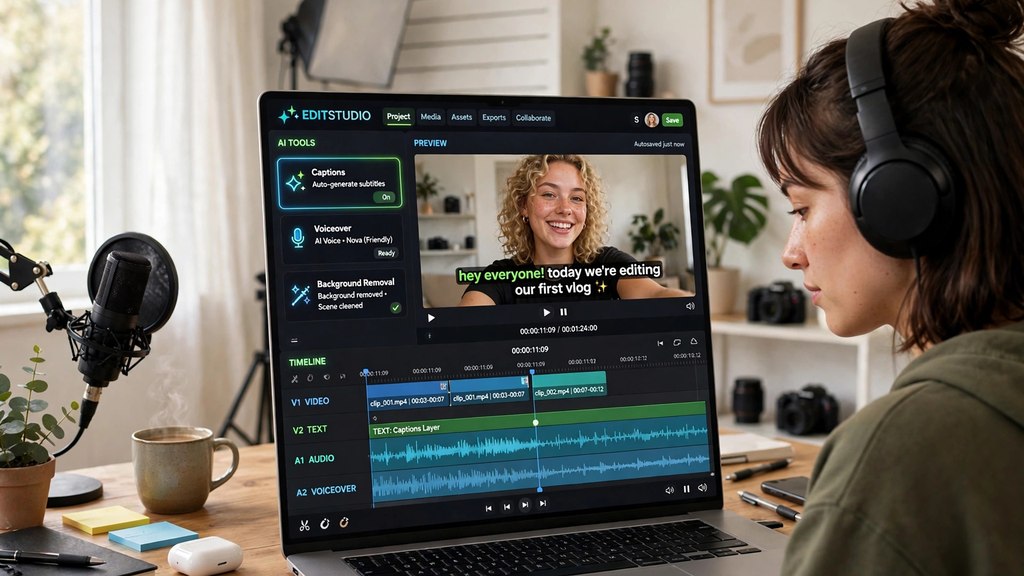
AI Video Editing Studio is a complete video editing studio that runs 100% inside your web browser. At its heart is a real timeline editor: multiple tracks for video, audio and text, where you can cut, trim, split, arrange and layer clips with precision — the pro way of editing, made simple with drag and drop.
What makes it different from every editor before it is the built-in AI team working beside you. Need footage? The AI video generator creates it from your idea. Need captions? One click, perfectly timed. Need a voiceover? Type your script and the AI speaks it — no microphone, no recording. Need a clean background? One click removes it, no green screen. Need music or sound effects? The AI generates them on demand. And if you have your own clips, you just upload them and edit away.
I review many AI video tools — generators like the one in my VidZonic AI review create videos for you, and tools like the one in my ViralSpeak AI review turn text into viral clips. AI Video Editing Studio is a different animal: it gives you a real editor’s control, with AI doing the slow jobs inside it. That combination is why I am excited about this launch.
AI Video Editing Studio Overview
| Product Name | AI Video Editing Studio |
| Creator | Uddhab Pramanik (Insource Apps) |
| Product Type | Browser-based timeline video editor with built-in AI tools |
| Price | $14.95 one-time (launch price) — no monthly fees |
| Launch Date | Thursday, November 20, 2026, at 11 AM EST |
| Works On | Windows, Mac and Chromebook — any computer with a browser |
| Commercial License | Included — edit videos for paying clients |
| Money-Back Guarantee | 30 days |
| Where To Buy | AI Video Editing Studio Official Website |
About The Creator — Uddhab Pramanik

AI Video Editing Studio was created by Uddhab Pramanik of Insource Apps, and if you read my blog regularly, you already know his work. He is the creator behind Self-PublishMistry AI and the 21-model dashboard I covered in my Best AI Models review — two products that did exactly what they promised.
Uddhab is also one of the most respected names on the affiliate side of this industry: a top 1% affiliate on WarriorPlus who consistently tops leaderboards and is known for supporting his launches hard. For buyers, what matters is the pattern I keep seeing in his products: one clear promise, a dashboard that delivers it, simple one-time pricing, and step-by-step training so nobody is left guessing. AI Video Editing Studio follows that same pattern — and it is his most ambitious tool yet.
How Does AI Video Editing Studio Work?
The whole system is built around a simple 3-step flow:
Step 1 — Upload or generate. Drop in your own video clips, images and audio — or start from the built-in stock library — or let the AI video generator create the footage from your idea. However you like to work, your media lands in one place.
Step 2 — Edit with AI. Drag your clips onto the multi-track timeline. Cut, trim, split and arrange them the pro way. Then let the AI team do the slow jobs in one click each: captions appear, perfectly timed. A voiceover is created from your script. The background disappears without a green screen. Music and sound effects are generated to fit your video. Titles, text and smooth transitions finish the polish.
Step 3 — Export and publish. Export in landscape, vertical or square — ready for YouTube, Shorts, Reels, TikTok and Facebook. Post it yourself, or deliver it to a paying client. Done.
When I walked through the studio, this flow is what impressed me most. In my old setup, those same three steps lived in five different apps. Here, I never left one browser tab.
✅ Visit AI Video Editing Studio Official Website Here ►
Why One Dashboard Beats Five Apps
Let me show you the real cost of the old way, because it is not only money. Picture a normal Tuesday for a creator. You open your editor — it needs an update. The update needs a restart. You finally edit your clips, then export and open a second app for captions — your credits there are low. A third app makes the voiceover, but the voice you like is on the paid tier. The music comes from a fourth site, where your license expired last week. By the time the video is finished, half your day is gone — and you made ONE video.
Now picture the same Tuesday inside AI Video Editing Studio. You open one browser tab. Your clips are on the timeline. Captions: one click. Voiceover: typed, generated, placed. Music and effects: generated in the studio. Background: removed in one click. Export in the format your platform wants. The difference is not a small convenience — it is the difference between posting three times a week and posting every day, between taking client work and turning it away.
There is a money side too. Five apps at even $15 a month each is $900 a year, every year. This studio is $14.95 once. But honestly, the time side matters more: every hour you stop spending on tool-juggling is an hour you can spend on ideas, scripts and growing your channel or your client list. That is the real product here — your time back.
AI Video Editing Studio Key Features
A Full Timeline Editor In Your Browser
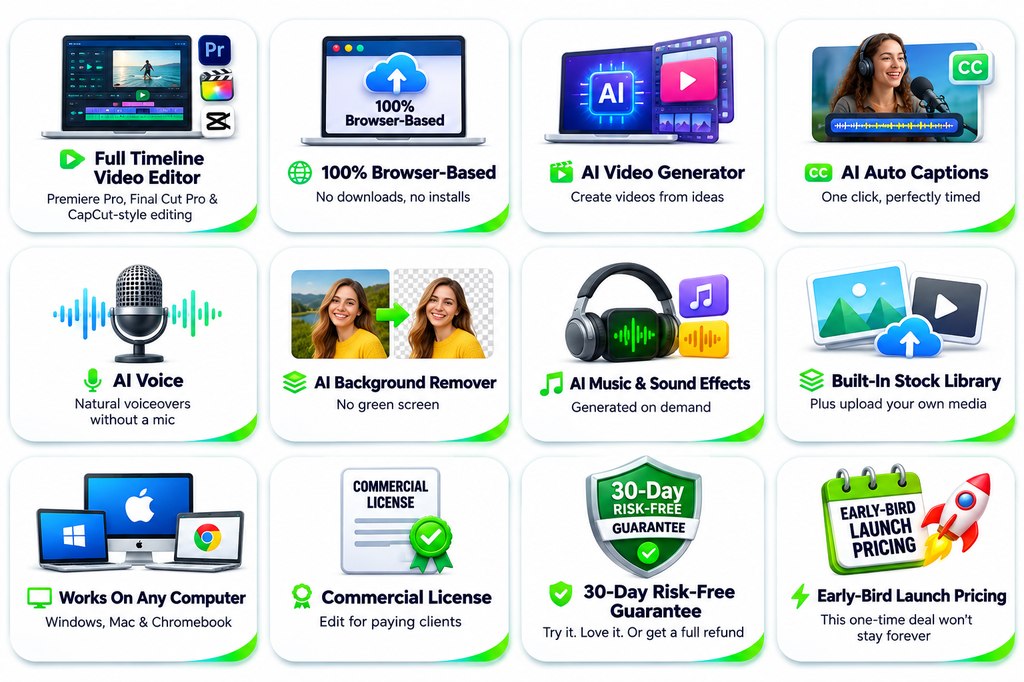
This is the headline feature, and it is the real deal: a multi-track timeline for video, audio and text layers, with cutting, trimming, splitting and arranging — the same editing style as Premiere Pro, Final Cut Pro and CapCut. But there is nothing to download, nothing to install and no updates to manage. Log in from any computer and pick up right where you left off.
AI Video Generator Built In
No footage? No camera? No problem. Turn a simple idea into ready-to-edit video footage right inside the studio, drop it on your timeline, and customize it. This alone replaces a separate AI video app subscription.
AI Auto Captions In One Click
Captions are not decoration — they boost watch time because so many people watch with the sound off. The studio turns speech into perfectly-timed captions automatically. No typing, no manual syncing, no separate caption tool.
AI Voiceovers — No Mic Needed
Type your script and get a natural, human-like voiceover. No microphone, no recording booth, no voice actors to hire. This is perfect for faceless channels — the exact workflow creators pair with tools like the ones in my MagicCanvas review — except here the voice lives inside your editor.
AI Background Remover — No Green Screen
Film yourself anywhere, then remove the background in one click and drop in any scene you like. Studios used to charge a fortune for this effect. Here it is a button.
AI Music And Sound Effects
Generate background music and sound effects on demand, matched to your video. No hunting through music sites, no expired licenses, no extra subscriptions.
Built-In Stock Library Plus Your Own Media
Pick clips, images and audio from the built-in stock library, or upload your own videos, images and audio and edit them exactly the way you want. Both sources live side by side in the same dashboard.
Made For Every Platform
Landscape for YouTube, vertical for Shorts, Reels and TikTok, square for feeds — the studio handles every format, with text, titles and smooth transitions to make each video look finished and professional.
Who Should Use AI Video Editing Studio?
- YouTubers and faceless channel owners who need editing, captions and voiceovers in one place
- TikTok, Reels and Shorts creators who must post often and cannot spend hours per video
- Freelancers who want to sell video editing and captioning services to clients
- Local businesses and agencies making promo videos, ads and property tours
- Affiliate marketers and course creators producing review and lesson videos every week — the same reason I keep video tools like the one in my CinemaSites AI review close
- Beginners who want pro-style editing without pro-level software or a pro-level computer
Who Should Not Use AI Video Editing Studio?
If you are a Hollywood-level film editor who needs cinema color grading suites and offline desktop rendering farms, a browser studio is not built to replace your whole pipeline. And if you never plan to make or edit videos at all, this tool has nothing to do for you. For creators, marketers, freelancers and businesses who make videos for the internet — which is almost everyone building an income online today — this studio was designed precisely for you.
What You Can Create With AI Video Editing Studio
Because the editor and the AI tools live together, the range of videos you can produce is wide. Here is what members typically build first:
- Faceless YouTube videos: AI-generated or stock footage on the timeline, an AI voiceover reading your script, captions on top — a complete channel workflow without ever filming yourself
- Shorts, Reels and TikToks: vertical exports with captions and music, made fast enough to post daily
- Video ads for local businesses: restaurants, gyms, salons, clinics and real estate agents all need short promos — and the commercial license lets you charge for them
- Course and training videos: clean lessons with titles, captions and a clear voiceover, edited lesson by lesson on one timeline
- Review and affiliate videos: product clips, your own screen media, voiceover and captions — the exact format that drives affiliate sales
- Talking-head videos with clean backgrounds: film anywhere, remove the background in one click, and drop yourself into a professional scene
Notice the pattern: every one of these used to need a different specialist tool. Inside this studio, they are all the same three steps — load media, edit with AI, export. Learn the flow once, and every video type is open to you.
AI Video Editing Studio By The Numbers
- 1 browser dashboard replacing 5+ separate editing and AI apps
- 3 simple steps: upload or generate, edit with AI, export and publish
- 6+ AI tools built in: video generator, captions, voiceovers, background remover, music and sound effects
- 3 computer types supported: Windows, Mac and Chromebook
- $14.95 one-time launch price — less than one month of Premiere Pro
- $0 in monthly fees, installs or extra subscriptions
- 30 days of full money-back protection
- Lifetime access with all core updates included
What Pro Editing Really Costs — And What This Costs
The official launch page makes a comparison I want you to see, because the numbers tell the story. Here is what “pro” video editing normally costs:
- Adobe Premiere Pro: $22.99 per month on a yearly plan — and usable on only one computer at a time
- Final Cut Pro: $299.99 — Mac only, no Windows, no Chromebook
- CapCut Pro: $19.99 per month — with many AI features running on limited credits
That is over $800 in year one — just for the editing software. Before AI voices. Before stock footage. Before music. And every one of those tools still makes you do the captions, the voiceover and the background work yourself or in yet another app.
Now compare AI Video Editing Studio: the full timeline editor, the AI video generator, captions, voice, background removal, music, sound effects and the stock library — all in one browser tab — for a one-time launch price of $14.95. That is less than a single month of Premiere Pro, paid once, yours for life. When I compare value across all the video tools I review, this is the kind of math that makes a launch worth moving fast on.
AI Video Editing Studio Pricing
- AI Video Editing Studio — complete studio: $14.95 one-time (early-bird launch price; the vendor values the full studio at $597/month)
- Full multi-track timeline video editor, 100% browser-based
- AI video generator, AI auto captions, AI voiceovers, AI background remover, AI music and AI sound effects
- Built-in stock video, image and audio library
- Commercial license included — edit videos for paying clients (the first 50 buyers get the commercial license activated free)
- Step-by-step video training included
- Lifetime access with all core updates included
- No subscriptions, no recurring payments, no hidden fees
- Covered by the full 30-day money-back guarantee
One honest timing note: this is a launch price. The launch opens on Thursday, November 20 at 11 AM EST, and the vendor has made clear that after the launch window the price increases and the offer moves away from this one-time deal. If the studio fits your plans, launch week is the moment to take it.
✅ Visit AI Video Editing Studio Official Website Here ►
Pros and Cons
Pros:
- A real multi-track timeline editor — Premiere Pro / Final Cut Pro / CapCut style — in your browser
- Six AI tools built in: video generation, captions, voiceovers, background removal, music and sound effects
- No downloads, no installs, no expensive editing PC — works on Windows, Mac and Chromebook
- Replaces 5+ separate apps and their monthly bills
- One-time $14.95 launch price with lifetime access and core updates
- Commercial license included — sell editing services to clients
- Beginner-friendly drag-and-drop with step-by-step training
- Full 30-day money-back guarantee
Cons:
- It is an internet-based studio, so you need a stable internet connection to edit
- The $14.95 one-time price is a launch offer — after the launch it increases and moves away from the one-time deal
My Walkthrough: Editing A Video Inside The Studio
Let me take you through the exact session that sold me on this tool. I started with a simple job: a 60-second promo video with captions, a voiceover and music — the kind of video a local business might order, due “by tonight”.
I opened the studio in my browser — no install, no waiting for a heavy program to load. I pulled two clips from the built-in stock library and added one of my own uploads. On the timeline, I trimmed the opening, split a clip to remove a dead section, and layered a title over the first three seconds. It felt like a pro editor — because it is one — but everything responded instantly in the tab.
Then the AI tools. I clicked for captions and watched them appear, timed to the speech. I typed a short script and generated the voiceover — no microphone, no quiet room, no retakes. The background of my own clip came off in one click and a clean scene went behind it. Music and a soft whoosh effect were generated inside the studio and dropped onto the audio track. Export: vertical, ready for Reels.
Total feel of the session? Like the editing team the launch page talks about — editor, caption writer, voice artist and sound designer — all sitting inside one tab, all answering to me. That is the experience you are buying for $14.95, and it is why my walkthrough turned into this recommendation.
Tips for New Members
1. Start with the training. The step-by-step video training shows you the studio in the right order — timeline first, then the AI tools. One watch-through saves you hours of guessing.
2. Make your first video small. A 60-second Short or Reel teaches you the full flow — upload, captions, voice, music, export — in one sitting. Then scale up to longer videos.
3. Always add captions. It takes one click and it is the single easiest way to hold viewers who watch on mute. Make it a habit from video one.
4. Use the stock library to move faster. When a scene is missing, do not stop and film — pull it from the library or generate it with AI, and keep your publishing rhythm alive.
5. Offer one client video early. The commercial license is included, and local businesses always need promos and Reels. One small client job can pay back your $14.95 many times over — and teaches you the studio faster than any tutorial.
✅ Visit AI Video Editing Studio Official Website Here ►
Frequently Asked Questions
Do I need to install anything to use AI Video Editing Studio?
No. The studio runs 100% in your web browser. There are no downloads, no installs and no updates to manage — you log in and edit from any computer.
Will it work on my computer?
Yes. It works on Windows, Mac and Chromebook — if your computer has a browser, it works. You do not need an expensive editing PC or special hardware.
Do I need video editing experience?
No. The editor is drag-and-drop beginner-friendly, the AI tools handle the heavy jobs in one click, and step-by-step video training is included to walk you through everything.
Can I use my own videos, images and audio?
Yes. Upload your own clips, images and audio and edit them on the timeline — or use the built-in stock library, or generate footage with the built-in AI video generator. All three options are inside the same dashboard.
Can I use AI Video Editing Studio for client work?
Yes. Commercial use is included, so you can edit videos for paying clients — local businesses, creators and agencies. The first 50 buyers get the commercial license activated free.
Is it really a one-time payment?
Yes — during this launch you pay $14.95 once and get lifetime access with all core updates included. No subscriptions and no recurring payments. After the launch window, the price increases and the offer moves away from the one-time deal.
What if I do not like it?
You are protected by a 30-day money-back guarantee. Try the studio, edit real videos with it, and if it does not make video creation faster, easier and cheaper for you, let the team know within 30 days for a full, hassle-free refund — no questions, no complicated process.
Final Verdict
My verdict: AI Video Editing Studio is the tool I have been waiting to see in this niche. Not another narrow AI generator, and not another heavy desktop editor — a real timeline editing studio, in a browser tab, with the six AI tools creators actually need built right inside it, from a creator whose last two products on this blog did exactly what they promised.
For $14.95 one-time — less than one month of Premiere Pro — you get the editor, the AI team, the stock library, the commercial license, the training and lifetime updates, all protected for 30 days. The launch opens Thursday, November 20 at 11 AM EST, and this price does not stay. If video is part of your income plan this year, click below and lock in your studio on launch day.