
Hey, this is Golam. Welcome to my Acti Review.
Let me ask you something simple. How many times today did you copy a text from one app, paste it into an AI chat, copy the answer, switch back, and paste it again? On your phone. With your thumbs. We all do this many times a day, and it wastes so much time.
Acti ends that silly loop. Acti is an AI keyboard for your phone and computer. It puts smart AI help right inside the keyboard you already use. You can dictate messages, translate your voice into other languages, and even run small tasks across 300+ apps — all without leaving the app you are typing in.
And right now, you can get Acti Pro for life with one small payment on AppSumo. No monthly bills. In this review, I will show you what Acti is, how it works, its best features, the full pricing, and what real buyers say about it. Let us start.
Introduction
Most AI tools live in their own app. You have to stop your work, open the tool, type your question, copy the result, and go back. That is slow, and it breaks your focus.
Acti takes a smarter road. Your keyboard is the one thing you use in every single app — messages, email, notes, social media, everything. So Acti puts the AI inside the keyboard. You type your idea, hold one bar, and the AI answers or takes action right there. No switching. No copying and pasting.
This is not a tiny unknown app either. Acti raised $5.3 million in seed funding, led by BITKRAFT Ventures. TechCrunch wrote about it. It was voted #1 Product of the Day, Week, and Month on Product Hunt. And on AppSumo, buyers rate it 4.92 out of 5 from 121 reviews.
In this Acti Review, I will walk you through everything in simple words, so you can decide fast if Acti is right for you.
What Is Acti?
Acti is an agentic AI keyboard and desktop assistant. “Agentic” is a big word, but the idea is simple: Acti does not just help you type words. It helps you finish tasks.
A normal keyboard only gives you letters. A normal AI assistant lives in a separate app. Acti joins both ideas into one tool. It sits where you already type, understands what you need, and helps you act on it right away.
Here is what that means in daily life. You are chatting with a friend who names a restaurant. You hold the space bar, and Acti finds the place, its rating, and a map link — right inside your chat. You need to reply to a client in Spanish. You speak in English, and Acti sends the message in Spanish. You want to save a note, create a meeting link, or check the weather. Acti can do it from the keyboard, connected to 300+ apps and APIs like Gmail, Slack, Notion, and Google Calendar.
The heart of Acti is something called Acts. An Act is a small, saved AI workflow — like a shortcut that does a job for you. There are more than 5,000 ready-made Acts you can use for free inside the app. And with the Act Builder Agent, you can build your own Acts just by describing what you want in plain words. No coding at all.
Acti works on iPhone and Android as a full keyboard. It also has a desktop app for Mac, and a Windows version is now in early beta for Acti Pro members. Your Acts and clips sync across your devices, and one license covers unlimited devices.
Acti Overview
| Product Name | Acti |
| What It Is | Agentic AI keyboard & desktop assistant that writes, dictates, translates & runs tasks where you type |
| Platforms | iPhone (iOS), Android, Mac desktop; Windows desktop in early beta |
| Top Features | Acti AI, 5,000+ ready-made Acts, Act Builder Agent, 300+ app & API connections, voice dictation, voice translate, Clips |
| Price | From $59 one-time — lifetime deal on AppSumo |
| AI Credits | 1,000 to 30,000 credits every month, depending on your tier |
| Buyer Rating | 4.92 out of 5 from 121 reviews on AppSumo |
| Guarantee | 60-day money-back guarantee on AppSumo |
| Best For | Solopreneurs, marketers, creators, freelancers & anyone who works a lot from their phone |
| My Rating | 4.8 out of 5 |
This table shows the short story. Acti gives you a full AI assistant inside your keyboard, on all your devices, for one payment. Now let me show you how it works in real use.
How Does Acti Work?
Acti is very easy to use. If you can type on a phone, you can use Acti. Here is the full flow, step by step.
Step 1: Install Acti and turn it on. Download Acti on your iPhone or Android phone and set it as your keyboard. You can also install Acti Desktop on your Mac. Sign in once, and your account works on unlimited devices.
Step 2: Type like you always do. Open any app — WhatsApp, Gmail, Notes, Instagram, anything — and type your message as normal. Acti is a full, comfortable keyboard for daily typing.
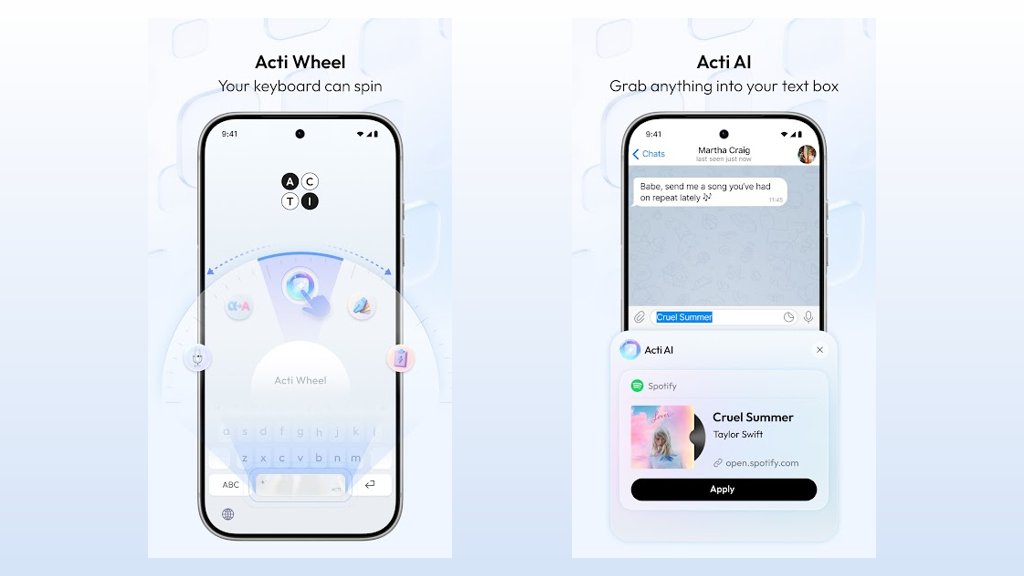
Step 3: Hold the space bar to open the Acti Wheel. When you need AI help, hold the space bar. A wheel opens with Acti AI and your saved Acts. Slide your finger to the one you want and let go.
Step 4: Let Acti AI answer or act. Ask for information, a rewrite, a translation, a restaurant, a map link, or a meeting link. Acti shows the result right on your keyboard. You check it, tap, and it goes into your message. No app switching at all.
Step 5: Run an Act for repeated jobs. For jobs you do again and again — like “rewrite this politely” or “save this to Notion” — just run the matching Act. One hold, one slide, done.
Step 6: Build your own Acts with Act Builder Agent. Open the Act Builder Agent and describe your task in simple words, like “Turn my short notes into a clean email.” The agent builds the workflow for you. You can test it, change it by chatting, and save it as your own Act.
Step 7: Enjoy it everywhere. Your Acts and Clips sync between your phone and your desktop. Start a task on your phone, and it is ready on your Mac too.
That is the whole system. Type, hold, slide, done. It feels natural after the first day.
Watch Acti In Action
Watch this short official video to see how Acti brings AI into the keyboard you use every day.
Get Acti Lifetime Deal Here
Key Features Of Acti
Acti is packed with useful features. Let me explain each one in simple words, so you know exactly what you get.
Acti AI: Smart Help Right Where You Type
Acti AI is your built-in assistant. It understands the context of what you are typing and gives you helpful answers, recommendations, and links on the spot. Looking for a restaurant, a song, or the weather? Ask from the keyboard and get the answer inside your chat. On desktop, you can highlight any text and ask Acti to rewrite it, translate it, improve it, or explain it. It also answers general questions, like a smart friend who lives inside your keyboard.
Acts: One-Tap AI Workflows
Acts are the real magic of Acti. An Act is a saved workflow that does a job in one move. Instead of typing the same instructions again and again, you run the Act. Acts can be simple, like fixing grammar or changing the tone of a message. Or they can be bigger jobs that use connected apps and APIs, like creating a meeting link or saving information to Notion. Hold the space bar, slide to your Act, and let go. The job is done.
Act Builder Agent: Build Your Own Acts Without Code
Do you have a task that no ready-made Act covers? The Act Builder Agent builds it for you. You just describe what you want in plain, natural language. The agent turns your idea into a working Act. You can refine it through a simple chat and make it fit your exact needs. A personal grammar checker, a translation helper, a multi-step business workflow — you describe it, and the builder creates it. You never write a single line of code.
5,000+ Ready-Made Acts From The Community
You do not have to build anything to start. The Acti Community already offers more than 5,000 ready-made Acts. Browse them, tap Add, and the Act appears in your keyboard panel, ready to use. You can also copy an Act and change it to fit your style, keep your own Acts private, or share them with others. New users get value in the first five minutes with these ready-made Acts.
Connects With 300+ Apps And APIs
Acti is not locked inside your keyboard. It connects with more than 300 apps, services, and APIs. That means your Acts can work with tools like Gmail, Slack, Notion, Google Calendar, and Calendly. Acti also has built-in tools for weather, maps, and sports that need no setup at all. And here is an important safety point: Acti asks for your approval before it takes action in a linked app. You stay in control.
Voice Dictation That Cleans Up Your Words
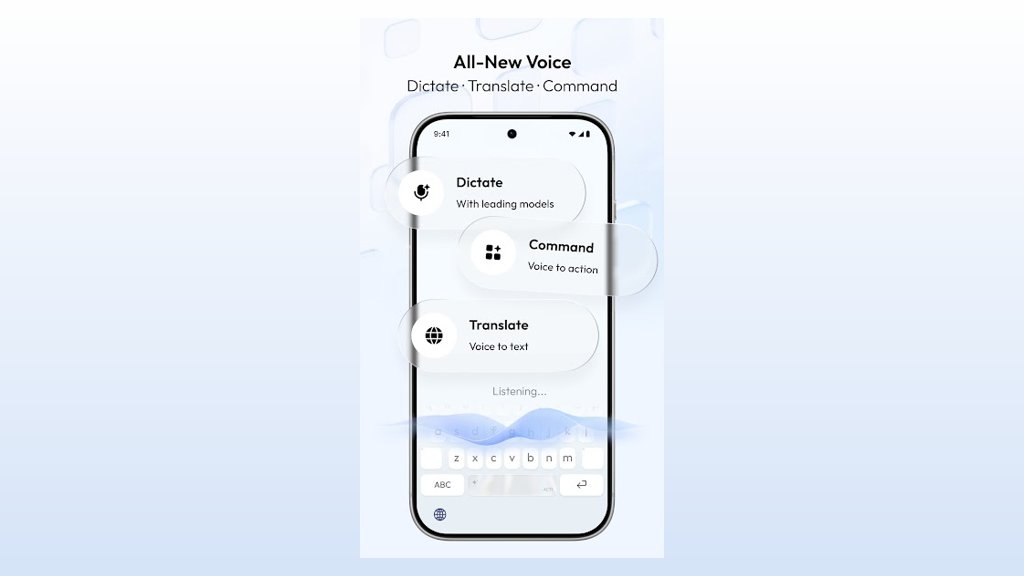
Talking is faster than typing, and Acti knows it. Its voice dictation turns your speech into clean, clear text. It fixes grammar and makes your words easy to read as you speak. Dictation works in more than 60 languages, so you can speak in your own language and still get polished text. Buyers on AppSumo praise the transcription quality again and again — several say it is better than the dictation tools they used before. For long messages, emails, and notes, this feature alone saves real time every day.
Voice Translate: Speak One Language, Send Another
This feature feels like magic the first time you try it. With Voice Translate, you speak in your language, and Acti writes the message in another language. It supports more than 100 languages. Speak in English and send in Spanish. Speak in your mother tongue and reply to a client in English. It is perfect for freelancers, sellers, and anyone who talks with people around the world. No separate translator app, no copying and pasting — just speak and send.
Clips And Text Shortcuts
Acti also remembers the small things for you. Clips is a smart clipboard that stores the text and links you copy, so you can find and reuse them later. Text shortcuts save the phrases you type all the time. Type a short code like “/address” and Acti inserts your full address. Your Clips and shortcuts sync across your phone and desktop, so they are always with you. These small helpers remove dozens of tiny delays from your day.
Acti Desktop For Mac (And Windows Beta)
Acti is not only for phones. Acti Desktop brings the same AI power to your Mac. Select text in any app and rewrite it, translate it, or explain it without switching windows. Run your saved Acts on your computer, use AI dictation, or even use your phone as a microphone for your desktop — great for talking to AI coding tools or writing long documents. The Windows desktop app is now in early beta for Acti Pro members, and the team is improving it fast. One license covers all your devices, with nothing extra to pay.
Private By Design
A keyboard sees a lot, so privacy matters. Acti is built with a clear and simple promise: your normal typing is not recorded and not sent to Acti’s servers. Everyday typing is processed on your device. Only when you use an AI feature or run an Act does Acti process the information needed for that request. Acti does not sell your personal information. Connected accounts always need your permission first. That is the right way to build a smart keyboard.
Who Should Use Acti?
Acti is a great fit if you see yourself in this list:
- Solopreneurs and freelancers who answer clients, write emails, and create meeting links from their phone all day.
- Marketers and affiliate marketers who reply to comments and messages fast, write captions, and fix their English in seconds.
- Content creators who turn spoken ideas into clean posts and replies right from the keyboard.
- People who talk in more than one language — chat, sell, and support customers across languages with Voice Translate.
- Busy professionals who want AI help without opening five different apps.
- Current dictation app users who pay monthly for tools like Wispr Flow and want dictation, translation, and workflows in one lifetime deal.
- Anyone who lives on their phone and wants to finish small tasks in seconds, not minutes.
Who Should Not Use Acti?
Acti is powerful, but it is not for everyone. You may want to skip it if you rarely type on your phone and do almost all your work on a Windows PC today — the Windows desktop app is still in early beta, while the Mac app is ready now. If you are not comfortable using any third-party keyboard at all, Acti is not for you. And if your company gives you a managed work phone that blocks third-party keyboards, check with your admin first. For everyone else, Acti fits easily into daily life.
Acti Pricing: Lifetime Deal On AppSumo
Here is the best part of this Acti Review. On AppSumo, Acti Pro comes as a lifetime deal. You pay once and use it forever. No monthly bill, no yearly bill. And your purchase includes all future plan updates, so your Acti keeps getting better at no extra cost.
All four tiers give you the same full features: Acti AI, 5,000+ ready-made Acts, the Act Builder Agent, 300+ app connections, voice dictation, voice translate, Clips, Acti Pro Desktop, and unlimited devices. The only difference is the number of AI credits you get each month. Credits are what the AI features use, and they refresh every month.
| License Tier 1 — 1,000 AI credits per month, all features, unlimited devices | $59 one-time |
| License Tier 2 — 3,000 AI credits per month, all features, unlimited devices | $109 one-time |
| License Tier 3 — 10,000 AI credits per month, all features, unlimited devices | $199 one-time |
| License Tier 4 — 30,000 AI credits per month, all features, unlimited devices | $399 one-time |
Which tier should you pick? Start with Tier 1 at $59 if you mostly dictate, translate, and run a few Acts a day — it is enough for most people, and simple voice typing is light on credits. Pick Tier 2 if you plan to use AI rewriting and workflows heavily every day. Tiers 3 and 4 are for power users and small teams who run Acts all day long. You can also move to a higher tier later if your needs grow.
Think about the value. Similar AI dictation tools cost around $144 every year. Tier 1 of Acti costs $59 once — it pays for itself in under six months, and after that, it is free for life.
Two simple deal terms to know: activate your license within 60 days of purchase, and every purchase is covered by AppSumo’s 60-day money-back guarantee. So you can test Acti on your own phone, with your own work, for two full months. If it does not become your daily keyboard, you get your money back. There is no risk in trying.
Get Acti Lifetime Deal Here
Pros And Cons Of Acti
Here is my honest, simple summary of the good and the not-so-good.
Pros:
- AI help lives inside your keyboard — no app switching, no copy-paste loop.
- Excellent voice dictation in 60+ languages that cleans up your words as you speak.
- Voice Translate lets you speak one language and send another, in 100+ languages.
- 5,000+ ready-made Acts, plus a no-code builder to create your own.
- Connects with 300+ apps and APIs, and asks your approval before acting.
- Every tier gets every feature and unlimited devices — you only choose your credits.
- Works on iPhone, Android, and Mac, with Windows now in beta.
- Loved by buyers: 4.92 out of 5 from 121 AppSumo reviews.
- Backed by a funded team ($5.3M seed) with a fast-growing roadmap.
- One-time price with a 60-day money-back guarantee.
Cons:
- AI credits refresh monthly and unused credits do not roll over.
- The Windows desktop app is still in early beta (Mac is fully ready).
- There is a small learning curve in the first days while you discover the best Acts.
- No BYOK option yet, so you cannot plug in your own AI API keys.
Real User Experience
Do not just take my word for it. Acti holds a 4.92 out of 5 rating on AppSumo from 121 buyer reviews — 114 of them are full 5-star reviews, and 435 buyers have already grabbed the deal. Here is what real buyers say, in simple words.
One verified buyer called the transcription “excellent” and praised how accurate it is across many languages. He said Acti does much more than dictation — automating tasks across apps is a huge time-saver — and that for a lifetime deal, it is absolutely worth it.
A detailed review from a Samsung Galaxy S24 Ultra user said the Android keyboard feels polished and practical, with helpful predictive text and easy access to custom Acts. He found the Act Builder intuitive because it keeps his original instructions and lets him copy and change them. His custom Acts sync between Android and Windows, the clipboard sharing works both ways, and he liked the Windows beta’s interface and clipboard history.
Several buyers who moved from other dictation tools like Wispr Flow and Letterly say Acti’s dictation and interface are better. A Japanese-English user loves switching languages inside the same keyboard. And one business user turned his whole library of business frameworks into Acts, so he can analyze business plans on demand, right from his keyboard.
The pattern is clear: once people make Acti their daily keyboard, they keep it.
Tips For New Members
If you grab this deal, these simple tips will help you get the most from Acti fast.
- Make Acti your only keyboard for one week. Real habits form fast, and the Acti Wheel will feel natural in a day or two.
- Start with 3–4 ready-made Acts. Pick the ones for jobs you do daily — a polite rewriter, a translator, a note saver — before you build your own.
- Use dictation for long messages. Speaking is 3x faster than thumb typing, and Acti cleans the text for you.
- Build one personal Act in week one. Describe one repeated job to the Act Builder Agent and feel the power of your own workflow.
- Activate your license on time — within 60 days of purchase — and use the 60-day guarantee window to test Acti with your real work.
Get Acti Lifetime Deal Here
Frequently Asked Questions
What is Acti in simple words?
Acti is an AI keyboard for your phone and computer. It helps you write, dictate, translate, and finish small tasks right where you type, without switching apps. You type your idea, hold the space bar, and Acti answers or takes action.
Which devices does Acti work on?
Acti works as a full keyboard on iPhone (iOS) and Android. The desktop app is ready for Mac, and the Windows desktop app is in early beta for Acti Pro members. One license covers unlimited devices, and your Acts and Clips sync between them.
What is the difference between the four pricing tiers?
Only the monthly AI credits. Tier 1 gives 1,000 credits per month for $59, Tier 2 gives 3,000 for $109, Tier 3 gives 10,000 for $199, and Tier 4 gives 30,000 for $399. Every tier includes all features, Acti Pro Desktop, and unlimited devices.
How do AI credits work?
AI features like Acts and agentic tasks use credits. Heavier tasks use more credits, and simple things like basic voice typing are light. Your credits refresh at the start of each month. Unused credits do not roll over to the next month.
Does Acti work in my language?
Very likely, yes. Acti’s voice dictation works in 60+ languages, and Voice Translate works in 100+ languages. You can speak in one language and send your message in another, right from the keyboard.
Is my typing private with Acti?
Yes. Acti does not record or send your normal typing to its servers — everyday typing is processed on your device. Only the information needed for an AI request is processed when you use Acti AI or run an Act. Acti does not sell your personal information.
Can I use my own AI API key (BYOK)?
Not yet. Acti is model-agnostic and manages the AI models and providers for you, so there is nothing to set up and no API keys to manage. The team is open to adding BYOK in the future based on user feedback.
What if Acti is not right for me?
You are protected by AppSumo’s 60-day money-back guarantee. Buy the deal, test Acti on your own phone with your real work for up to two months, and if you are not happy, ask AppSumo for a full refund.
When do I need to activate my license?
Activate your license within 60 days of your purchase. It takes just a few minutes, and then your lifetime access is locked in.
Want more tools like this? Read my MagicCanvas Review for an all-in-one AI image and video studio, my guide on how to make money with AI tools for simple income ideas, my Rival Ads Review to see every ad your competitors run, and my VidZonic AI Review for fast AI video creation.
Final Verdict
Acti is one of the smartest ideas I have seen this year. Instead of making you visit another AI app, it brings the AI to the one place you already live — your keyboard. Dictation that cleans up your words, voice translation in 100+ languages, 5,000+ ready-made workflows, your own no-code Acts, and connections to 300+ apps, all in the keyboard you type on every day.
The proof is in the buyers: 4.92 out of 5 from 121 AppSumo reviews, with people switching from paid dictation tools and keeping Acti as their daily keyboard. Add a funded team, a Product Hunt #1 run, a live Windows beta, and a one-time price from $59 with a 60-day money-back guarantee — and this is an easy deal to say yes to.
My advice: grab Tier 1 today, make Acti your keyboard for one week, and let it win you over. If you are a heavy AI user, Tier 2 is the sweet spot. Deals like this do not stay on AppSumo forever, and once it is gone, the monthly bills come back. Get it while it is here.