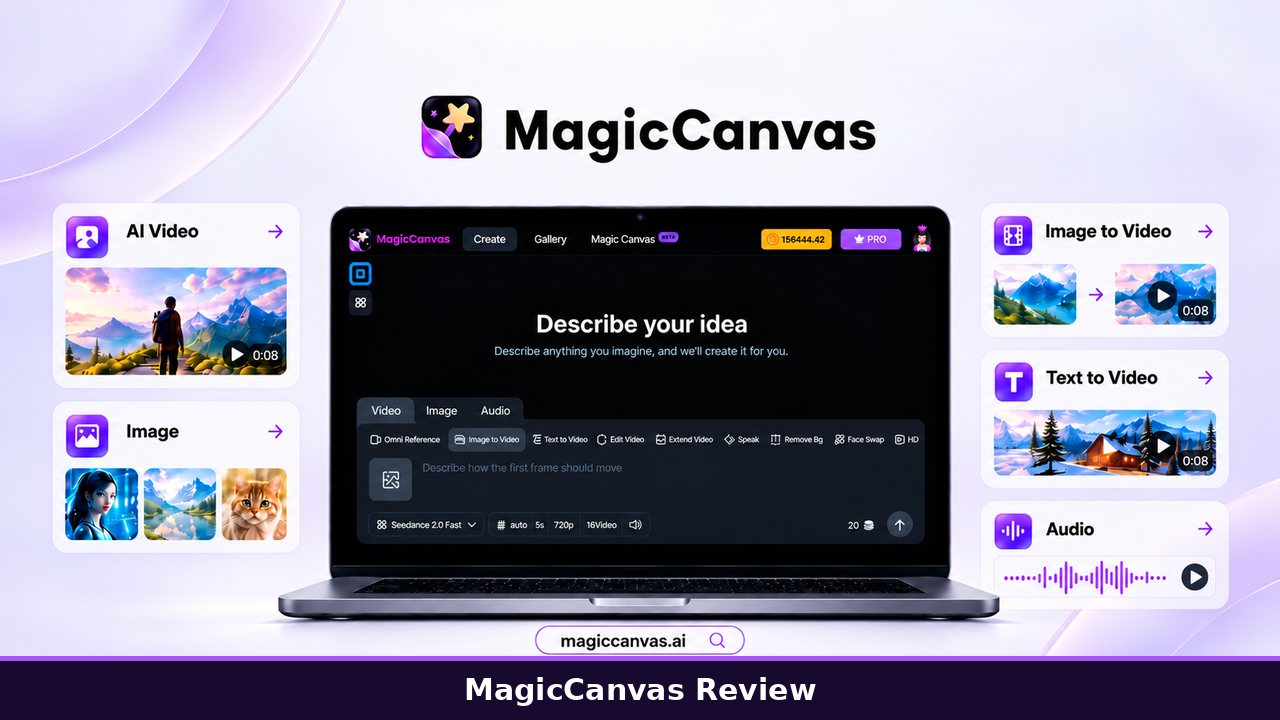
Hey, this is Golam. Welcome to my MagicCanvas review.
Here is a problem almost every marketer and creator knows. You want one good ad video, a few product images, and a nice social post. So you open one AI tool for images. Another for video. Another for editing. Each one wants a monthly payment. Each one works in a different way. Your whole day is gone — and your wallet is lighter.
MagicCanvas fixes this. It puts 30+ AI tools and 16+ of the world’s best AI models — Google Veo, Seedance, Wan, Kling, Nano Banana, GPT Image, and more — into ONE simple visual canvas. Images, videos, edits, and even audio, all in one place. And right now on AppSumo, you can get it for a one-time price starting at just $49. No monthly fees. Lifetime access.
In this review, I will show you exactly what MagicCanvas is, how it works, every main feature, all four pricing tiers, and who should grab this deal before it is gone. Let us start.
Introduction
Video and images run the internet today. Ads, YouTube videos, TikToks, product pages, social posts — everything needs strong visuals. The people and businesses who create good visuals fast are the ones who win customers and views.
AI made visual creation much easier. But it also created a new problem: tool overload. One app for text-to-video. One for AI images. One for face swaps. One for removing backgrounds. Each with its own price, its own credits, and its own way of working.
MagicCanvas was built to end that mess. The team behind it — based in San Francisco — calls it “the AI creative studio we wished existed for fast-moving teams.” Their idea is simple and powerful: one workspace, every top AI model, every creative tool you need, from first idea to final export.
The best part? Because of the AppSumo lifetime deal, you pay once — from $49 — and use it for life, with a fresh set of credits every month and full commercial rights on everything you create. Let me show you how it all works.
Think about the normal cost for a moment. A good AI video tool alone can cost $20 to $50 every month. A strong AI image tool costs more on top. Then add an editor, a background remover, and a face swap app. Many creators quietly pay $100 or more every single month — that is $1,200 a year — just to keep their content flowing. MagicCanvas puts all of it in one place for a single $49 payment. The math is not hard. This is why lifetime deals like this one get so much attention: you stop renting your tools and start owning them.
What Is MagicCanvas?
MagicCanvas is an all-in-one AI creative studio that runs in your browser. It brings together more than 30 AI tools and more than 16 leading AI models in one visual canvas, so you can create, edit, and finish polished images and videos much faster.
Inside, the tools are organised into three simple groups: Image, Video, and Audio. For images, you get famous models like Nano Banana, GPT Image, Seedream, and Qwen. For video, you get Google Veo, Seedance, Wan, Kling, MiniMax, HappyHorse, and Gemini models. You pick the model that fits your job, type a simple prompt, and the AI creates it.
You can make things from zero — type words and get an image or a video. You can also start from your own photo or video and improve it: swap a face, remove a background, change clothes, restore an old photo, upscale to HD, or turn a still image into a moving video.
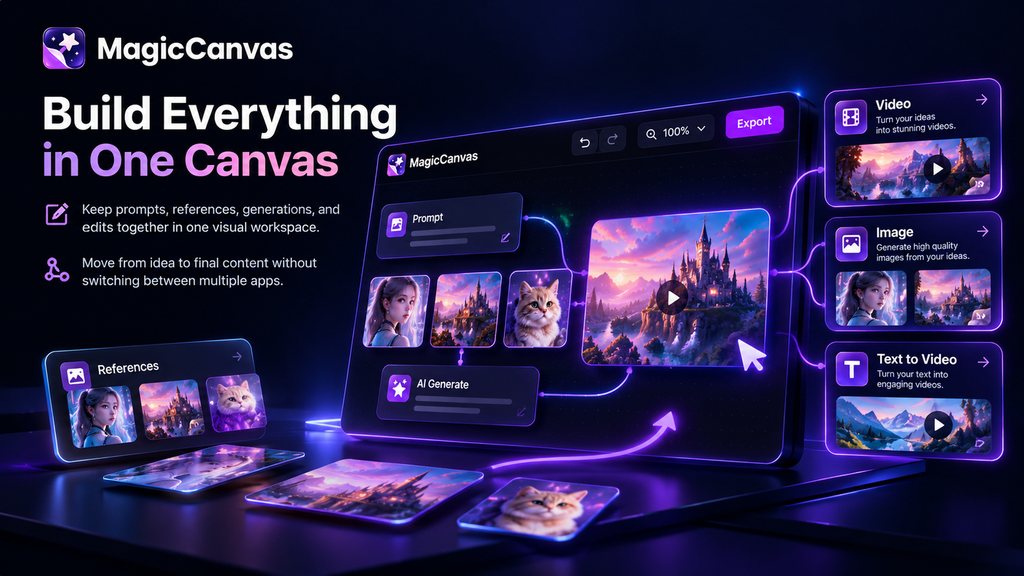
There is also a smart node-based workflow canvas. This lets you connect tools into a chain — for example: generate an image, remove its background, then turn it into a video — and save that chain as a template. Next time, the same full edit runs on a new photo in one go.
Everything you export has no watermark, and commercial use rights are included in every plan. That means you can legally use your creations in ads, client work, and products you sell. And with this lifetime deal, you pay once and never pay monthly fees again.
MagicCanvas Overview
| Product Name | MagicCanvas |
| What It Is | All-in-one AI creative studio: 30+ AI tools & 16+ top AI models for images, videos, edits & audio in one visual canvas |
| Top Models Inside | Google Veo, Seedance, Wan, Kling, MiniMax, HappyHorse, Nano Banana, GPT Image, Seedream, Qwen |
| Price | From $49 one-time (Tier 1 list price $199) — lifetime deal on AppSumo |
| Credits | 125 to 1,600 credits every month, depending on your tier |
| Watermark | No watermark on exports |
| Rights | Full commercial use rights in every tier |
| Guarantee | 60-day money-back guarantee on AppSumo |
| Best For | Marketers, creators, freelancers, agencies & small teams |
| My Rating | 4.6 out of 5 |
How Does MagicCanvas Work?
Creating with MagicCanvas is simple. The flow has just a few easy steps:
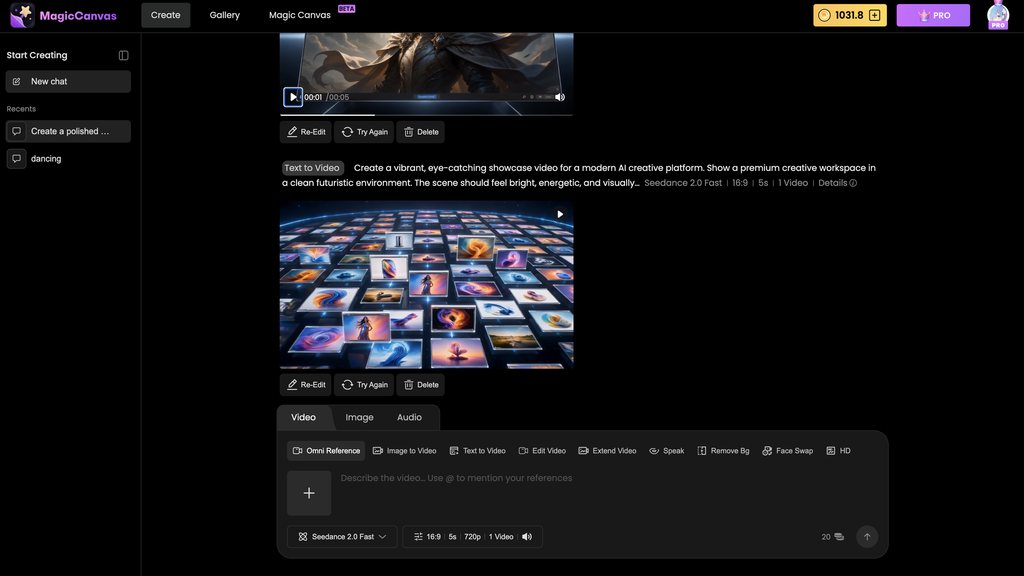
Step 1: Choose what you want to make. From the top menu, pick Image, Video, or Audio. Then choose a feature — for example, Text to Video, Image to Video, Face Swap, or Background Remover.
Step 2: Pick a model and describe your idea. Choose one of the AI models (each model family has its own strength), then type a prompt that describes what you want. You can also upload a reference image if the model supports it — this helps the AI match your subject or style.
Step 3: Set the details and generate. Adjust simple settings like duration, aspect ratio (16:9, 9:16 and more), and resolution. You can see the credit cost before you start. Click Generate — and your result appears in your conversation workspace, ready to view, re-edit, try again, or download.
And when you find an edit you love, the workflow canvas takes it further. Connect your steps once — generate, clean up, animate, export — save it as a workflow template, and repeat that same professional edit on every new photo or video. This is how small teams produce campaign after campaign without starting from zero each time.
The AI Models Inside MagicCanvas, Explained Simply
Models are the “brains” that create your pictures and videos. Each famous model has its own style and strength. MagicCanvas gives you the best ones together, and you just pick the one you like. Here they are in plain words:
For images: Nano Banana (from Google’s Gemini family) is loved for fast, smart photo edits and keeping people and products looking the same across pictures. GPT Image is great at following detailed instructions and making images with text. Seedream (including Seedream 5.0 Pro in the app) makes rich, artistic images with beautiful detail. Qwen is a strong all-rounder for clean, accurate generations.
For videos: Google Veo (Veo 3 and Veo 3 Fast) is one of the most famous video models in the world, known for smooth, realistic, cinematic clips. Seedance 2.0 — in Mini, Fast, and Standard versions — is the speedy workhorse: great motion, quick results, and friendly credit costs. Wan is a powerful open video family, strong at creative and unusual styles. Kling is famous for lifelike people and natural movement. MiniMax and HappyHorse add even more styles and speed options.
For audio: there is an audio section too, so your videos can get the sound they need inside the same workspace.
Why does having many models matter? Because no single model is best at everything. One is best for a product photo, another for a flowing landscape, another for a talking character. With MagicCanvas, you are never stuck with one style — you have a whole studio of brains, and you choose per job. And as the platform adds updates to your tier’s features, your one-time payment keeps getting better.
Watch MagicCanvas In Action
This is the official MagicCanvas video from AppSumo. Watch how fast an idea becomes a finished image or video inside the canvas. Seeing the workspace in action will tell you more than any list of features can.
Get MagicCanvas Lifetime Deal Here
Key Features Of MagicCanvas
Now the fun part. Let me walk you through the main features, one by one, in simple words.
16+ Top AI Models In One Place
This is the heart of MagicCanvas. Instead of paying for many separate AI apps, you get the best models together: Google Veo, Seedance 2.0 (Mini, Fast and Standard), Wan, Kling, MiniMax, HappyHorse and Gemini for video; Nano Banana, GPT Image, Seedream and Qwen for images. Different models are best at different jobs — here you can simply switch and use the right one every time.
Text To Image & Smart Photo Edits
Type a few words and get a beautiful image. Or upload your own photo and edit it with simple prompt-based edits: change a part of the picture, clean it up, or restyle it. It feels like telling a designer what to change — in plain words.
Text To Video & Image To Video
Describe a scene and watch it become a real moving video — with camera movement and cinematic effects. Or take any still image and bring it to life: your product photo starts moving, your artwork starts flowing, your character starts acting. For social ads and short videos, this feature alone is worth the price.
Node-Based Workflow Canvas
The visual canvas is what makes MagicCanvas different from normal AI generators. You connect tools like blocks — generate an image, remove the background, add a face, animate it — and the whole chain runs in order. Save your chain as a template, and your best edit becomes a one-click system you can reuse forever.
Full AI Editing Toolkit
All the everyday fixes are built in: AI Replace and Magic Eraser to remove or change objects, background remover for both images and videos, AI expansion (outpainting) to make pictures bigger, HD upscale for sharp results, and photo restoration that brings old or damaged photos back to life.
Face Swap, Lip Sync & Portrait Tools
Swap faces in photos and videos, make a person speak your script with lip sync, remove a video background, and retouch portraits like a pro. These are the tools behind viral videos, fun content, and professional presenter-style clips.
AI Wardrobe & Interior Staging
Two special tools deserve a mention. AI Wardrobe changes the clothes on a person in a photo — perfect for fashion sellers who want many looks from one photo shoot. Interior staging fills empty rooms with beautiful furniture — a dream tool for real estate agents and home sellers.
Storyboard Generation & Video Templates
Planning a video? The storyboard tool helps you lay out your scenes before you create them, and the ready video templates give you a fast, proven starting point. You do less guessing and finish videos faster.
No Watermark & Full Commercial Rights
Every export is clean — no watermark, ever. And commercial use rights are included in all tiers, so you can use everything you make in ads, client projects, social media, and products you sell. Your work is truly yours.
Learning Courses Included
New to AI creation? MagicCanvas includes learning courses that teach you how to use the tools well. You are not left alone with a blank canvas — you learn the skills as you create.
Who Should Use MagicCanvas?
This deal is a perfect fit for you if:
- You are a marketer who needs ads, product visuals, and campaign assets every week
- You are a content creator making YouTube videos, TikToks, or Reels
- You run a small team or agency and want one creative tool for everyone
- You sell products online and need fresh images and videos without photo shoots
- You are a freelancer who wants to sell AI image and video services to clients
- You are tired of paying monthly fees for 4–5 different AI tools
If you said yes to even one of these, MagicCanvas was made for you.
Who Should Not Use MagicCanvas?
Let me be fair. If you only need one tiny thing — for example, you only ever remove backgrounds once a month — a free single tool may be enough for you.
Also, the very newest Seedance 2.5 model is not part of these lifetime tiers (you get Seedance 2.0 and the full standard model library, which covers almost every real job). And Tier 1’s 125 monthly credits suit light creators best — heavy daily video producers should look at Tier 2 or above. For everyone else, this deal is strong value.
MagicCanvas Pricing
MagicCanvas is on AppSumo as a lifetime deal. You pay one time — no monthly fees — and you get lifetime access to your tier’s features, all future updates to those features, and a fresh set of credits every month.
| License Tier 1 — 125 credits per month, full standard model library, all 30+ tools, workflow canvas, no watermark, commercial rights | $49 one-time |
| License Tier 2 — 440 credits per month, everything in Tier 1 with a much bigger monthly credit pack | $189 one-time |
| License Tier 3 — 900 credits per month, for heavy creators and small teams | $389 one-time |
| License Tier 4 — 1,600 credits per month, plus exclusive MovieStudio access | $689 one-time |
How do credits work? Every creation costs credits, and the cost depends on the model and settings you choose — for example, a short 5-second video at 720p with the fast Seedance 2.0 model costs about 20 credits. You always see the cost before you generate, so there are no surprises. Your credits refresh every month.
Here is a simple way to think about the tiers. If you post on social media a few times a week, Tier 1’s 125 monthly credits will already keep you busy — remember, a quick 720p video can cost around 20 credits, and images cost less. If you run ads or client work, Tier 2’s 440 credits remove the stress of counting every creation. And because this is a lifetime deal, your credits keep refreshing every month for as long as the product lives — pay once in 2026, still creating years from now.
Which tier should you pick? If you create a few times a week for social media or your own business, Tier 1 at $49 is a sweet start (its normal price is $199). If you create content daily or work with clients, Tier 2 gives you breathing room. Tiers 3 and 4 are for power users and teams — and only Tier 4 includes MovieStudio.
And remember: every tier is protected by AppSumo’s 60-day money-back guarantee. You have two full months to test everything. If MagicCanvas is not right for you, you get your money back. There is no real risk in trying it.
Get MagicCanvas Lifetime Deal Here
Pros And Cons Of MagicCanvas
Pros
- 30+ AI tools and 16+ top models in ONE workspace — no more tool switching
- World-class models: Google Veo, Seedance, Wan, Kling, Nano Banana, GPT Image
- Images, videos, edits, and audio — all covered
- Node-based workflow canvas: save your best edits as reusable templates
- No watermark on any export, on every tier
- Full commercial rights included — use and sell your creations freely
- One-time price from $49 with lifetime access and future updates
- Fresh credits every month, with the cost shown before you generate
- Learning courses included, so beginners improve fast
- 60-day money-back guarantee — a full two months to decide
Cons
- Seedance 2.5 is not included in the lifetime tiers (Seedance 2.0 and the standard library are)
- MovieStudio access is only on Tier 4
- It is a credit system — very heavy video users will want a higher tier for more monthly credits
Tips For New Members
Just grabbed the deal? Here is how to get the most from MagicCanvas in your first week:
- Start with one model per job. Try Nano Banana or GPT Image for pictures, and Seedance 2.0 Fast for quick videos. Learn what each model does best before switching around.
- Use reference images. When a model supports it, upload a reference photo. Your results will match your product or character much better.
- Build one workflow early. The day you save your first workflow template (for example: generate → remove background → animate), your production speed doubles. This is the feature most new users ignore — do not be one of them.
- Watch the credit cost. Test ideas at lower settings first (720p, fast models), then create your final version at the best quality. Your monthly credits go much further.
- Take the learning courses. A few short lessons will make your prompts 10x better — and better prompts mean better videos with fewer wasted credits.
- Download your best work. Keep your favourite creations saved on your own drive, organised by project, so you can reuse them in ads and posts any time.
Get MagicCanvas Lifetime Deal Here
Frequently Asked Questions
What is MagicCanvas?
MagicCanvas is an all-in-one AI creative studio. It brings 30+ AI tools and 16+ leading AI models into one visual canvas, so you can create, edit, and finish images, videos, and audio much faster.
Is the AppSumo deal really lifetime access?
Yes. Your license gives you lifetime access to your tier’s features and your monthly credit allowance, including future updates to those features. You pay once — there are no monthly fees.
Which AI models are included?
For images: Qwen, Seedream, GPT Image, and Nano Banana. For video: Seedance (including Seedance 2.0 Mini, Fast and Standard), Wan, HappyHorse, MiniMax, Kling, Gemini, and Google Veo. Seedance 2.5 is not part of the lifetime tiers.
How do credits work?
You get a set number of credits every month (125 on Tier 1, up to 1,600 on Tier 4). Each creation costs credits based on the model and settings you choose, and the cost is shown before you generate. Your allowance refreshes monthly.
Can I use what I create for business?
Yes. Commercial use rights are included in every tier, and exports have no watermark. You can use your images and videos in ads, client work, and products you sell.
What is MovieStudio?
MovieStudio is an extra creative workspace included only with License Tier 4 — the top tier with 1,600 credits per month.
What if MagicCanvas is not right for me?
You are covered by AppSumo’s standard 60-day money-back guarantee. Test it for two full months, and if it is not for you, get a full refund.
Do I need a powerful computer or any installation?
No. MagicCanvas runs in your browser on the company’s cloud computers. Any normal laptop works. You just log in, describe your idea, and create.
Can I try MagicCanvas before buying?
The official MagicCanvas website lets new users earn some free credits by signing up and completing simple tasks, so you can test a few AI photo tools first. But the smart way to lock in the lowest price is the AppSumo lifetime deal — with the 60-day guarantee, you can test everything for two months with no risk.
What can I actually make with it?
Social media ads, product videos, YouTube and TikTok clips, thumbnails, product photos, fashion look-books, real estate room photos, restored family photos, talking videos with lip sync, and much more — images, videos, edits, and audio, all from one canvas.
If creating content is part of your business, you may also love my VidZonic AI review — it turns any idea into 3D cinematic animated story videos in more than 100 languages. And for making your ads, my Go Beaver AI review shows how to spy on competitors’ winning ads and clone them into your own ads, posts, and emails in seconds.
Final Verdict
MagicCanvas is exactly the kind of tool I love to find on AppSumo. One clean workspace. The world’s best AI models — Veo, Seedance, Nano Banana, GPT Image, Kling — working side by side. Tools for every creative job: images, videos, face swaps, lip sync, background removal, restoration, staging, storyboards, and reusable workflows.
Normally, this level of power means five subscriptions and hundreds of dollars a year. Here, it starts at $49 — once. Add no-watermark exports, full commercial rights, monthly credits that keep coming for life, and a 60-day money-back guarantee, and this is one of the easiest “yes” decisions of the season.
My honest advice: start with Tier 1 if you create for yourself, or Tier 2 if content is your business. Either way, grab your lifetime deal while it is on AppSumo — deals like this do not stay forever, and when it is gone, the monthly pricing is what comes back.
One last thought. Tools like this reward the early movers. While others are still paying monthly rent on five different AI apps, you will be creating with all of them in one canvas — for a single payment you made once. Every month that passes, this deal quietly pays you back. That is the real magic of MagicCanvas.