Hey, this is Golam. Welcome to my TubeHarvest Review.
I have tested a lot of AI video tools this year. Almost all of them do the same thing: you type something in, you get a video file out, and that is the end of the story. You upload it, you get some views if you are lucky, and then those viewers are gone forever. You cannot reach them again. You own nothing.
TubeHarvest is the first tool I have tested that refuses to stop at the video. When I planted my first topic, it gave me the full faceless video, 3 Shorts, a thumbnail, and the SEO — and then it kept going and built me a matching opt-in page and a free lead magnet guide, so my viewers can become email subscribers I actually own.
In this review, I will show you exactly what TubeHarvest does, how the Harvest Loop works step by step, who created it, what it costs (including the bundle and a $50-off coupon), and why I believe it is the smartest faceless YouTube tool launching this year. The cart opens on Tuesday, November 17, 2026 — so let me show you everything before the doors open.
Introduction
YouTube is the second-largest search engine in the world, and it is owned by the largest one, Google. Every day, millions of people search it for answers, tutorials, and recommendations. That traffic is completely free — no ads to buy, ever.
So why do so few beginners use it? Because making videos the normal way is hard. One video means researching, scripting, recording your voice, editing, designing a thumbnail, and planning SEO. Then doing it all again next week. Most people never start, and most of the rest burn out within a month.
And here is the problem nobody talks about: even the creators who push through are building on rented land. A viewer watches, enjoys, and scrolls away — and you never see them again. Views fade. An email list is yours forever. That is the gap TubeHarvest was built to close, and it connects perfectly with my guide on how to make money on YouTube without showing your face. In the rest of this review, I will walk you through the full system exactly as I experienced it — the package, the list-building side, the pricing, and the launch bonuses — so you can decide with complete information before the cart opens.
What Is TubeHarvest?
TubeHarvest is a cloud-based AI app that turns any topic into a complete, upload-ready faceless YouTube package — and then builds the list-building side for you as well.
You type one topic. TubeHarvest creates:
- A full long-form faceless video — scripted, voiced with a natural AI voice, edited with matching visuals and captions
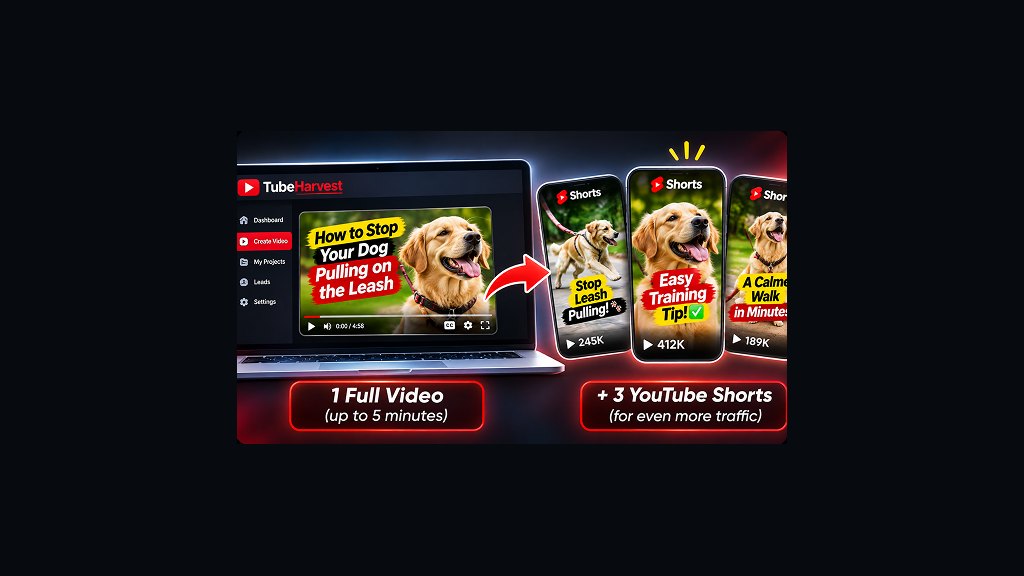
- 3 ready-to-post Shorts, re-cut automatically from the strongest moments of your video
- A bold AI thumbnail designed for your topic
- Keyword-rich SEO titles, descriptions and tags, plus social captions to share your video everywhere
- A hosted opt-in landing page with email capture, built around your video’s topic
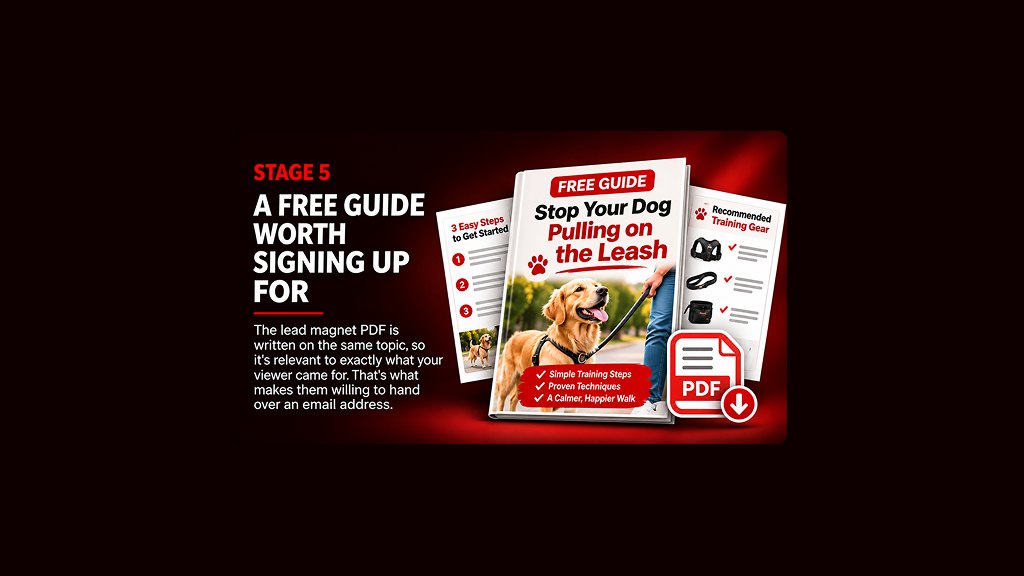
- An automatic lead magnet PDF — a mini-guide on the same topic, delivered to every new subscriber
The creators call this the Harvest Loop: plant a topic, harvest the free YouTube traffic, and keep the subscribers. One credit makes one complete package, everything is included, and you need no API keys and no other tools. When I tested it, that “everything included” part is what impressed me most — there was nothing else to buy, connect, or figure out.
TubeHarvest Overview
| Product Name | TubeHarvest (TubeHarvest Commercial) |
| Creators | Max Gerstenmeyer & Wayne Crowe |
| What It Is | A cloud AI app that turns one topic into a faceless YouTube package + opt-in page + lead magnet |
| Price | $47 one-time during launch (goes to $97/month after Nov 23) |
| Launch | Opens Tue Nov 17, 2026, 11:00 AM Eastern — closes Mon Nov 23, 11:59 PM Eastern |
| Guarantee | 14-day money-back guarantee |
| Official Website | Visit TubeHarvest Official Website Here |
Meet The Creators: Max Gerstenmeyer & Wayne Crowe

TubeHarvest was created by Max Gerstenmeyer, the product creator and developer, together with his launch partner Wayne Crowe, a well-known name in the affiliate marketing world through his OLSP training community.
Their story is simple and honest. They looked at every faceless video tool on the market and noticed they all did the same thing: hand you a video file and stop. The views came and went, and the creator had nothing to show for them. So they asked one question — why stop at the video? A viewer who joins your list is someone you can reach next week, next month, and next year. So they built the landing page and the lead magnet right into every package.
I like creators who build from a real frustration instead of copying the market, and that is exactly what happened here. Max also personally handles affiliate and review questions on Messenger, which tells you the creators stand close to their own product.
How Does TubeHarvest Work?
TubeHarvest runs on a simple loop the creators call the Harvest Loop. Here is how it worked when I used it:
Step 1: Plant Your Topic
You type one topic — for example, “how to stop your dog pulling on the leash.” That is all TubeHarvest needs from you. No script, no research, no camera, no microphone.
Step 2: TubeHarvest Builds Your Video Package
The app writes the script, generates the natural AI voiceover, edits the video with matching visuals and captions, and designs your thumbnail. It also writes your SEO title, description, and tags, ready to paste into YouTube. From the same video, it automatically cuts 3 vertical Shorts from the strongest moments, so your topic works twice.
Step 3: Your Opt-In Page And Lead Magnet Are Built For You
From that same topic, TubeHarvest builds a hosted opt-in page offering a free guide — in the dog example, “The Loose-Leash Walking Checklist” — and writes the lead magnet PDF itself. You paste the page link into your video description. That is the whole setup.
Step 4: Upload, Publish, And Watch Your List Grow
You upload the video and the Shorts. Viewers find you through YouTube search, suggested videos, and the Shorts feed. The ones who want the free guide click through and join your email list. Now you can email them about every new video and every helpful offer — long after any single video stops trending. Then you plant the next topic, and the loop repeats.
Watch The TubeHarvest Demo Here
Do not take my word for it — watch one real topic become a complete package and a live landing page, inside the app:
✅ Visit TubeHarvest Official Website Here ►
TubeHarvest Key Features
A Complete Faceless Video Package From One Topic
The long-form video is the heart of every package. It is fully scripted, voiced with a natural AI voice, and edited with matching visuals and captions. On the front-end plan, videos run up to 5 minutes. You never appear on camera and never record a word. In my test, going from a blank topic to a finished, upload-ready video in one sitting felt almost unfair compared to the old way.
3 Ready-To-Post Shorts In Every Package
The Shorts feed is where brand-new channels get discovered, because YouTube shows Shorts to people who have never heard of you. TubeHarvest automatically re-cuts the strongest moments of your video into 3 vertical Shorts. One topic now works twice — long-form for search, Shorts for discovery.
AI Thumbnail Creator
A great video with a weak thumbnail gets no clicks. TubeHarvest designs a bold, high-contrast thumbnail for your topic automatically — no design app, no stock photo hunting, no freelancer to pay.
SEO Titles, Descriptions, Tags And Social Captions
Every package comes with keyword-rich titles, a full description, and tags written for you, plus social captions so you can share the video everywhere. This is the part beginners usually skip, and it is the part that helps your videos get found in search for months.
Matching Opt-In Page With Email Capture
This is the feature that separates TubeHarvest from every other video tool I have reviewed. Your video gets a hosted opt-in page built around its exact topic, ready to drop into your description. No page builder subscription, no tech setup. If you are new to list building, pair this with my free guide on how to build an email list for free and you have the complete system.
Automatic Lead Magnet PDF
People join lists when you give them a good reason. TubeHarvest writes a mini-guide on your video’s topic and delivers it to every new subscriber automatically. Because the guide matches exactly what the viewer just watched, it feels personal and relevant — and that is what makes people happily hand over their email address.
Commercial License For Client Work
The front-end plan is TubeHarvest Commercial, and the commercial license is included. Local businesses, coaches, authors, and online sellers all know they should be on YouTube, but most have no time or skills. You can create complete packages for them — video, Shorts, thumbnail, SEO, and a lead-capturing page — charge your own price, and keep what you charge, with no extra license fees. It works beautifully alongside tools like VidZonic AI in a video services toolkit.
100% Cloud-Based — Nothing To Install, No API Keys
TubeHarvest runs in any modern browser on Mac or PC. There is nothing to download, and everything you need to create your packages is included in your plan — no API keys to buy or connect. One credit makes one complete package, so the system is easy to understand and easy to budget.
TubeHarvest Vs Regular AI Video Tools
To see why I rate TubeHarvest so highly, compare it with a regular AI video app:
- Regular tools give you one video file. TubeHarvest gives you the video plus 3 Shorts, a thumbnail, and full SEO in the same package
- Regular tools leave your viewers on YouTube, where the algorithm owns them. TubeHarvest moves viewers onto your own email list through a matching opt-in page
- Regular tools make you write your own lead magnet — or skip list building completely. TubeHarvest writes and delivers the lead magnet PDF for you
- Regular tools often need a page builder, a design app, and stock footage sites on top. TubeHarvest includes everything in one app with no API keys
- Regular tools usually charge every month. TubeHarvest Commercial is one payment of $47 during the launch
- Regular tools rarely include client rights at the entry price. TubeHarvest includes a full commercial license on the front end
That last point about ownership is the one that matters most to me. A channel can slow down, a video can stop trending, and an algorithm can change overnight. Your email list answers to nobody. Every package you publish with TubeHarvest grows an asset that stays yours, and that is a completely different business from chasing view counts.
Who Should Use TubeHarvest?
- Complete beginners starting from zero — no channel, no audience, no experience
- Anyone who wants free YouTube traffic without paying for ads
- People who want a YouTube channel without ever being on camera
- Affiliate marketers who would rather build an email list than chase views alone
- Busy people who want to publish consistently without spending their evenings editing
- Freelancers and agencies who want to sell complete video packages to local businesses and clients
- Creators tired of juggling five or more tools and their monthly bills
Who Should Not Use TubeHarvest?
TubeHarvest is not a push-button get-rich-quick scheme, and it does not pretend to be one. If you are not willing to upload your videos and share your page links each week, no tool can help you. And if you truly enjoy scripting, recording, and editing every step by hand, you will not need it. For everyone else who wants the work done and the list growing, it fits perfectly.
TubeHarvest Pricing
During the launch, the front end is TubeHarvest Commercial at $47, one-time. Here is exactly what it includes:
- Any topic turned into a complete, upload-ready faceless video package
- 10 complete video packages every month
- Long-form videos up to 5 minutes
- 3 Shorts per package
- 1 AI thumbnail per package
- SEO titles, descriptions and tags, plus social captions
- 1 landing page template with email capture and a basic lead magnet PDF
- Commercial license — create for your own channels and for clients
Two small optional add-ons are offered at checkout:
- Niche Harvest Vault — $9 one-time: 100 pre-researched faceless niches with 30 topic ideas each, plus matching affiliate offer categories and lead magnet angles for every niche
- Thumbnail & Hook Booster — $14 one-time: 3 thumbnail variations per package for split testing, plus AI-written opening hooks and alternate title pairs
If you want more power later, these optional upgrades are available (you never need them to start):
- TubeHarvest Fastpass — $277 one-time: every upgrade below in one purchase
- TubeHarvest Premiere — $47/month: 30 packages a month, videos up to 10 minutes, 5 Shorts per package, priority rendering and full HD 1080p export (lighter downsell: TubeHarvest Plus, $27/month, 20 packages)
- Harvest Growth — $47 one-time: 5 landing page templates plus affiliate bridge pages, an auto-written 5-email follow-up sequence for each lead magnet, and more lead magnet formats like checklists and mini courses (Lite version $27)
- Harvest DFY Channel Pack — $37 one-time: done-for-you channel profile picture, banner and description, plus 30 pre-generated topics and playlists (Lite version $17)
- Whitelabel Rights — from $97: rebrand TubeHarvest as your own platform and offer client accounts (25 accounts $97, Starter 50 $197, Rights 300 $297)
The smartest deal is the Bundle. The TubeHarvest Bundle is $297 one-time and includes Commercial plus Premiere, Harvest Growth, the DFY Channel Pack, and Whitelabel Starter 50 — with a big credit pool and a bring-your-own-API-key option. Use the coupon code Harvest50 at checkout and you get $50 off, bringing the Bundle to just $247.
✅ Get The TubeHarvest Bundle Deal Here ►
Buyers during the launch can also claim 7 exclusive bonuses stacked on this promotion:
- Top G Traffic Method
- Nxtera
- The Big Redirect
- Stream Shark
- Freebie Cheetah
- CoinSprint
- Magnetify
One timing warning: the $47 one-time Commercial price is a launch thank-you. When the cart closes on Monday, November 23 at 11:59 PM Eastern, Commercial moves to $97/month, and the alternative Personal plan costs $27 every month for fewer packages. Paying $47 once, today, is clearly the better maths.
And you are protected: TubeHarvest comes with a 14-day money-back guarantee. Log in, plant a few topics, and harvest your first packages. If it is not the right fit, contact support within 14 days of purchase and you will be refunded in full.
✅ Visit TubeHarvest Official Website Here ►
TubeHarvest Pros And Cons
Pros
- One topic gives you the video, 3 Shorts, thumbnail, SEO, opt-in page, and lead magnet — everything
- The only faceless video tool I know that builds your email list, not just your view count
- No camera, no microphone, no editing, no design skills needed
- $47 one-time during launch with 10 packages every month — no monthly fee
- Commercial license included, so you can sell packages to clients
- No API keys or extra tools needed — everything is included
- 100% cloud-based, works on Mac and PC in any browser
- Bundle with coupon Harvest50 is excellent value for serious users
- 14-day money-back guarantee makes it risk-free to try
Cons
- The front end is capped at 10 packages a month (Premiere raises it to 30)
- Front-end videos are up to 5 minutes (longer videos need Premiere)
- The $47 one-time price ends when the launch closes on November 23
Real User Experience
TubeHarvest was tested by real beta users before this launch, and their feedback matches what I found. One beta tester, Andrei, shared that he had always wanted to run multiple YouTube channels, but the workload — ideas, scripts, filming, editing, thumbnails — kept holding him back. After testing TubeHarvest, he found he could enter one line, click a button, and get an entire package: full-length video, Shorts, thumbnail, description, and even a landing page with a lead magnet. He said he can finally see himself running multiple faceless channels without spending all day creating content.
Another tester, Sam, said he has played with quite a few AI tools, but this one surprised him — and the part he liked most was the landing page with a lead magnet, because you are not just making videos, you are building something that can grow into a real business. A third tester, Tom, put it simply: what would normally take him hours and a bunch of different tools is now done in one place.
That is exactly the feeling I had in my own test. The package is complete, and the list-building side is the part no other tool gives you.
Tips For New Members
1. Register for the free launch webinar. On Tuesday, November 17 at 10:00 AM Eastern — one hour before the cart opens — Max and Wayne run a live training showing the whole system. Register through the official link and watch it live.
2. Start with the Niche Harvest Vault. If you add one thing at checkout, make it the $9 Vault. Having 100 researched niches with 30 topic ideas each means you never stare at a blank screen wondering what to plant first.
3. Always paste your opt-in link first. The moment your video goes live, put your landing page link at the top of the description. The list is the asset — never publish a video without it.
4. Publish the Shorts too. Your 3 Shorts are already made. Post them across the week to pull new viewers into your long-form video and your page.
5. Stay consistent. Ten packages a month is a powerful rhythm — roughly two to three videos a week. Consistency is what turns a new channel into a traffic source, and it pairs well with the other AI tools I cover in how to make money with AI tools.
6. Serious about this? Take the Bundle with the coupon. If you already know you will use TubeHarvest heavily, the Bundle at $247 with Harvest50 gives you every upgrade for less than the Fastpass alone.
✅ Visit TubeHarvest Official Website Here ►
Frequently Asked Questions
Can I Use TubeHarvest Without Showing My Face Or Recording My Voice?
Yes. TubeHarvest creates faceless videos with an AI voiceover. You never appear on camera and never speak into a microphone.
Do I Need Any Technical, Editing, Or Design Skills?
No. If you can type a topic and upload a video to YouTube, you can use TubeHarvest. The scripting, voiceover, editing, thumbnail design, SEO, page building, and lead magnet writing are all done for you.
What Do I Get From Just One Topic?
A complete package: a full-length faceless video (up to 5 minutes on the front end), 3 Shorts, an AI thumbnail, SEO titles, descriptions and tags, social captions, plus a matching opt-in page with email capture and a free lead magnet PDF on the same topic.
Is The $47 Commercial Price Really One-Time?
Yes — during the launch, TubeHarvest Commercial is a single payment of $47 with no monthly fee, and it includes 10 packages every month. When the launch ends on November 23, the price goes to $97/month, so the launch window is the time to grab it.
Can I Use TubeHarvest For Clients?
Yes. The Commercial license lets you create packages for your own channels and for paying clients. You set your own prices and keep what you charge, with no extra license fees. Tools like CinemaSites AI show how strong this client-services direction is becoming.
Do I Need API Keys Or Other Paid Tools?
No. Everything you need to create your packages is included in your plan. TubeHarvest is 100% cloud-based and works on Mac or PC in any modern browser — nothing to install.
Is There A Money-Back Guarantee?
Yes. You are covered by a 14-day money-back guarantee. Log in, plant a few topics, and see your first packages and your live opt-in page. If TubeHarvest is not the right fit, contact support within 14 days of purchase for a full refund.
Final Verdict
After testing TubeHarvest, my verdict is clear: this is the most complete faceless YouTube tool I have reviewed. Every other tool hands you a video and wishes you luck. TubeHarvest hands you the video, the Shorts, the thumbnail, the SEO — and then the opt-in page and lead magnet that turn viewers into an email list you own forever.
Views fade. Lists last. For a one-time $47 during the launch — with a commercial license, 10 packages every month, 7 launch bonuses, and a 14-day money-back guarantee — TubeHarvest is an easy recommendation from me. The cart opens Tuesday, November 17 at 11:00 AM Eastern and closes Monday, November 23. Plant your first topic, and start harvesting.